Upload System Prompt
This topic describes how to upload a custom system prompt, which can be applied to your tenants and those of your resellers.
Background information
System prompts can be applied to NovoOne Tenant to provide instructions for callers. For example, if a password is required for a meeting, callers will be prompted to enter password before they successfully join the meeting.
NovoOne Platform provides built-in system prompts, if you want to provide custom system prompts for tenant use, you need to contact Yeastar Support to record your own prompts, and upload them to NovoOne Platform.
Prerequisites
- Contact Yeastar Support to record your own prompt.
- The prompt file must meet the following requirements:
- File Type:
.tar - File Name: Special characters are NOT allowed.
- File Size: Up to 100 MB
- File Type:
Procedure
- Log in to NovoOne Platform portal, go to .
- At the top of the prompt list, click Upload.
- In the pop-up window, complete the following settings.
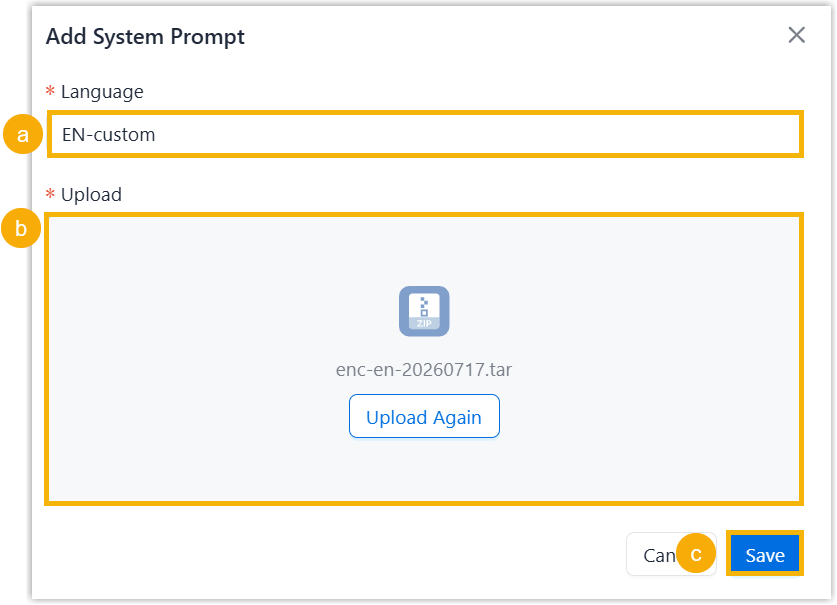
- In the Language field, enter the prompt
language.Note:
- The maximum character length is 127; only letters and
special characters
()_:\.-are allowed. - The language MUST not be identical to that of the built-in prompts.
- If the language is identical to that of existing custom prompts, the original custom prompt will be overwritten.
- The maximum character length is 127; only letters and
special characters
- Click Choose a File to upload a
.tarfile from your local computer. - Click Save.
- In the Language field, enter the prompt
language.
Result
- The uploaded prompt file is displayed on System
Prompt list within Custom
type.

- The uploaded prompt is available for tenants owned by you and your resellers.
What to do next
To apply the uploaded prompt for a tenant, go to Tenant >  > Default > Language > System Prompt Language, select a desired prompt language corresponding to the prompt from
the drop-down list and click Save.
> Default > Language > System Prompt Language, select a desired prompt language corresponding to the prompt from
the drop-down list and click Save.
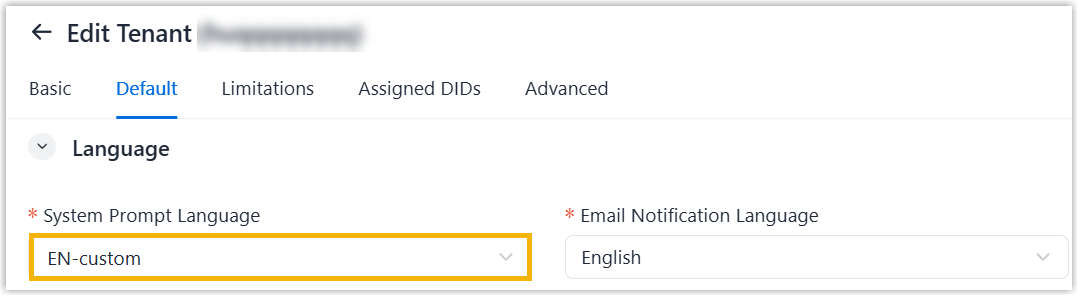
Tenants using this prompt will be listed in the Applied Tenant column (Path: ).
