Handle Incoming Calls Based on Caller ID
This topic describes how to configure Caller ID-based rules to determine how incoming calls are handled.
Procedure
- Log in to NovoOne Web Client, then go to .
- In thee Call Handling Based on Caller ID section, do
as follows to add a rule:
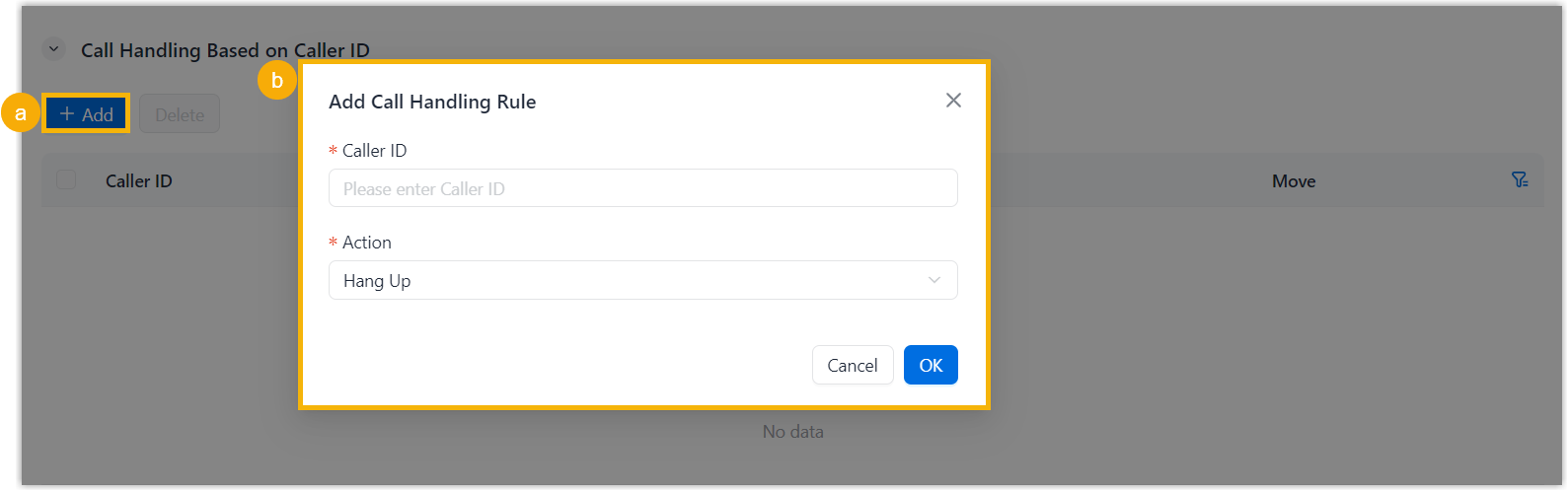
- Click Add.
- In the pop-up window, configure the call handling rule, then click
OK.
Setting Description Caller ID Enter an exact number (e.g. 550086) or a number pattern (e.g.9011.Note: For more information about the supported characters in number patterns, see Supported Pattern Syntax.Action Select an action to determine how incoming calls matching the Caller ID are handled. - Hang Up
- User
- User Voicemail
- IVR
- Play Prompt then Hang Up
- Receive CallsNote: By default, all incoming calls are allowed to reach the user. If a call handling rule is configured to prevent spam calls (e.g.728373XX) from reaching the extension, but the user wants to accept calls from a specific number (e.g.72837300), you can create another rule to accept calls from 72837300.
- Click Save.