Version 65.16.0.192

Release Date: February 4, 2026

Improvements

Password Strategy
Optimized password policy for administrator password, extension registration password and extension user password to enhance system security, mitigating critical risks such as unauthorized system access, toll fraud, and data breaches.

The password strength policy is determined by the Allow Weak Password option (Path: Settings > System > Security > Service), with specific rules for each password type as listed below:

  • Administrator password
    Note: You are required to change your password to a strong one in the following scenarios:
    • On your first login to the PBX web interface.
    • When logging in to the PBX web interface with a weak password when the Allow Weak Password option is disabled.
    Strong password

    (The "Allow Weak Password" option is disabled)

    Basic password

    (The "Allow Weak Password" option is enabled)

    • At least 10 characters
    • At least 1 uppercase letter
    • At least 1 lowercase letter
    • At least 1 digit
    • Consecutive numbers are not allowed (e.g., 4567)
    • At least 8 characters
    • At least 1 uppercase letter
    • At least 1 lowercase letter
    • At least 1 digit
  • Extension registration password
    Strong password

    (The "Allow Weak Password" option is disabled)

    Basic password

    (The "Allow Weak Password" option is enabled)

    • At least 16 characters
    • At least 1 uppercase letter
    • At least 1 lowercase letter
    • At least 1 digit
    • Allowed special characters include only ~, ^, *, -, _, and ?
    • At least 8 characters
    • At least 1 uppercase letter
    • At least 1 lowercase letter
    • At least 1 digit
    • Allowed special characters include only ~, ^, *, -, _, and ?
  • Extension user password
    Strong password

    (The "Allow Weak Password" option is disabled)

    Basic password

    (The "Allow Weak Password" option is enabled)

    • At least 10 characters
    • At least 1 uppercase letter
    • At least 1 lowercase letter
    • At least 1 digit
    • Allowed special characters include only ~, ^, *, -, _, and ?
    • Consecutive numbers are not allowed (e.g., 4567)
    • The extension number and the caller ID are not allowed
    • At least 6 characters
    • At least 1 uppercase letter
    • At least 1 lowercase letter
    • At least 1 digit
    • Allowed special characters include only ~, ^, *, -, _, and ?
Extensions
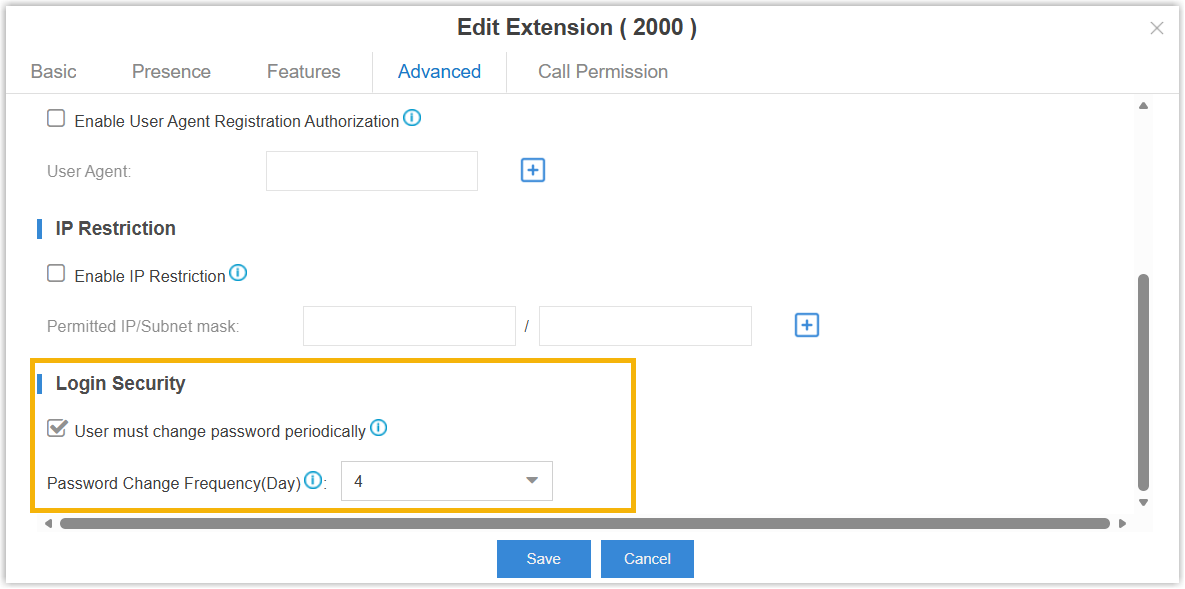
Added support for configuring mandatory password change policies for extensions (Path: Settings > PBX > Extensions > Advanced > Login Security). You can control whether to force extension users to change their user passwords and specify the required change frequency.
Call Control

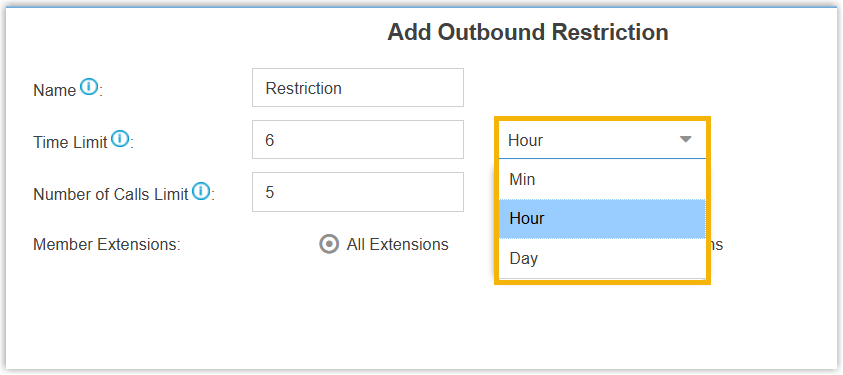
Optimized Outbound Restriction: Added support for selecting a time unit (Min, Hour or Day) when configuring the Time Limit for an outbound restriction rule (Path: Settings > PBX > Call Control > Outbound Restriction), providing more precise control over the restriction time period.
Linkus Server
Added compatibility with PBX password policy to enhance Linkus client security:
  • If the User must change password periodically feature is enabled, extension users will be required to periodically change their password to continue using Linkus, ensuring account security.
  • If strong password policy is required (the Allow Weak Password option is enabled), when extension users log in to the Linkus with a weak password, they will be forced to change their password to a strong one.