Add a Custom Dashboard
A custom dashboard allows you to view call statistics based on different teams and time zones. This topic describes how to add a custom dashboard in Linkus Desktop Client.
Limitation
A maximum of 100 dashboards are supported.
Procedure
- Log in to Linkus Desktop Client, go to Call Analytics.
- At the top of the list, click
 .
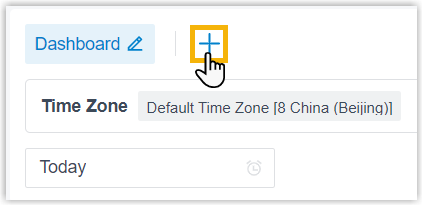
- In the pop-up window, configure the following settings, then click
Confirm.
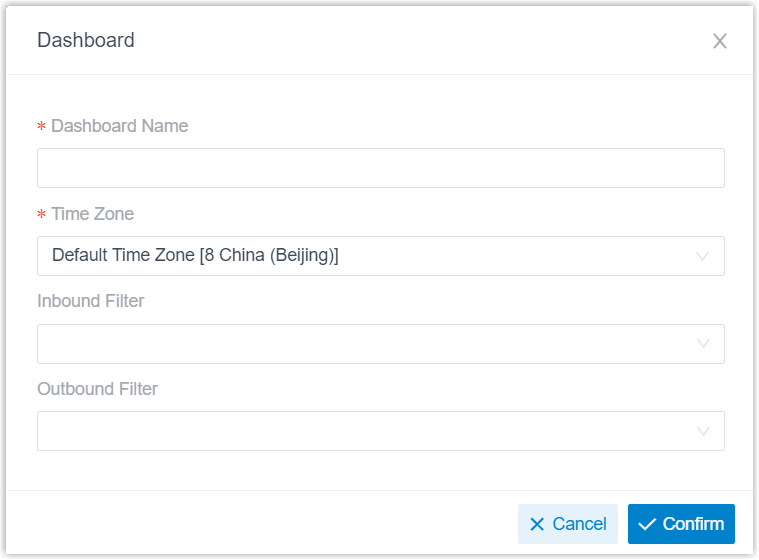
Setting Description Dashboard Name Enter a name to help identify the dashboard. Time Zone Select a time zone for the dashboard. Inbound Filter Select one or more existing teams to include in inbound call statistics, or click New Team to add a team. Note: For more information about adding a team, see Add a Team.Outbound Filter Select one or more existing teams to include in outbound call statistics, or click New Team to add a team. Note: For more information about adding a team, see Add a Team.
Result
The custom dashboard is created and displayed.
What to do next
Manage the dashboard widgets to customize the statistics displayed.
For more information, see Manage Widgets.