Set up Speed Dial
This topic describes how to configure speed dial prefix and set up speed dial numbers on NovoOne Tenant portal.
(Optional) Step 1. Change speed dial prefix
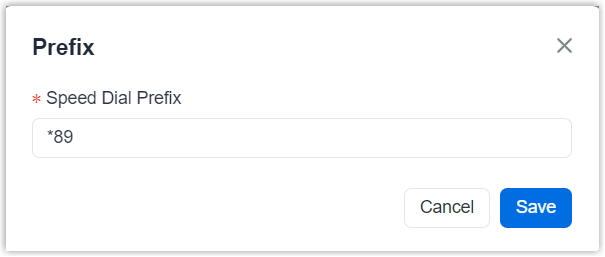
Speed dial prefix is a feature code used to identify speed dial calls. Users need to
dial it before the speed dial number when placing a call. The default prefix is
*89, you can change it as needed.
- Log in to NovoOne Tenant portal, go to .
- At the top of the list, click Prefix.
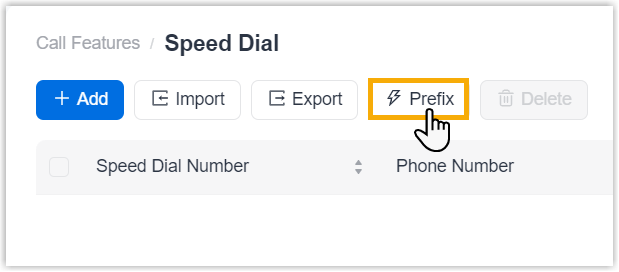
- In the pop-up window, change speed dial prefix as needed, then click
Save.
Step 2. Add a speed dial number
Note: This section describes how to add speed dial numbers
individually. You can add multiple speed dial numbers at once by importing them.
For more information, see Import speed dial numbers.
- Log in to NovoOne Tenant portal, go to .
- Click Add.
- In the pop-up window, configure the following settings, then click
Save.
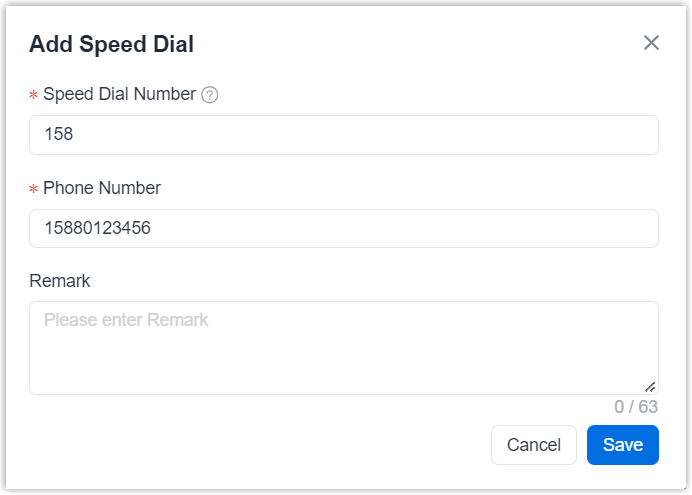
Setting Description Speed Dial Number Set a short code for the phone number. Phone Number Enter the full phone number that the speed dial number maps to. This can be an internal or external number. Remark Enter a description of the speed dial number. This description is displayed on the outgoing call interface.
Result
Users can dial the speed dial prefix followed by the speed dial number to quickly call the corresponding phone number.