Pick up a Call for a Specific Extension
Users can pick up a ringing call for a specific extension using either a feature code or a BLF key on an IP phone.
Pick up a call using feature code
- Prerequisites
- You have configured the call pickup feature code.
- Procedure
- Users can pick up a ringing call for a specific extension by dialing {call_pickup_feature_code} + {target_extension_number}.
- Result
-
- A call is established between the caller and the user who performs the pickup.
- The endpoint where the original callee extension is registered displays a missed call.
Pick up a call using BLF key
You can provision a BLF key on an IP phone, allowing users to monitor a specific user's call status and pick up a ringing call to the user extension using the BLF key. This can be implemented in either of the following ways:
- Configure BLF keys individually on IP phone's web interface.
For more information, contact the phone manufacturer.
- Provision BLF keys in bulk.
For more information, see the following instructions.
- Prerequisites
-
You have provisioned a user's extension on an IP phone. For more information, see Auto Provision an IP Phone.
- Procedure
-
- Assign a BLF key for a user.
- Log in to NovoOne Tenant portal, go to .
- Click
 beside the
desired user.
beside the
desired user. - In the Function Keys tab, add
and configure a function key to monitor user
extension's call status.
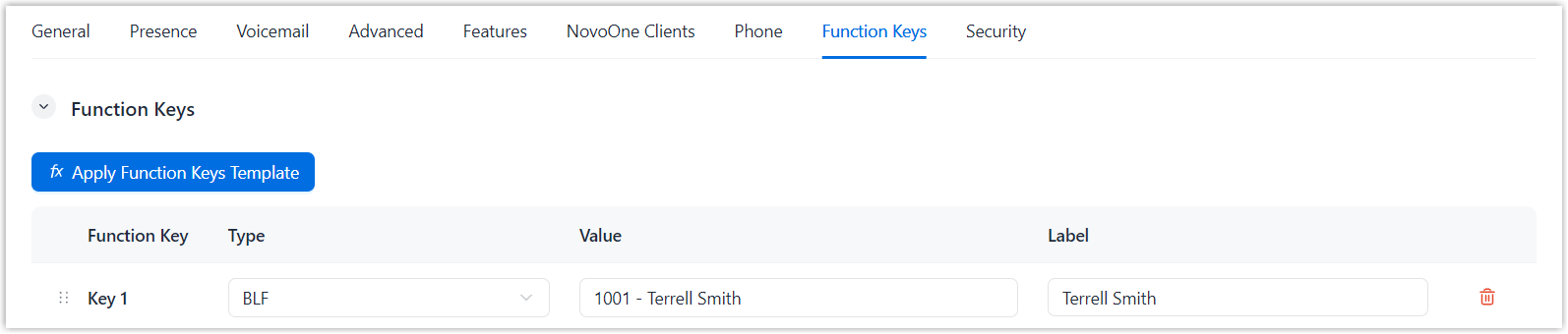
Setting Description Type Select BLF. Value Select the target user extension. Label Optional. Enter a label, which will be displayed on the phone screen. - Click Save.
- Re-provision IP phone.
- Go to .
- Click
 beside the IP
phone, then select Reboot and
confirm the operation.
beside the IP
phone, then select Reboot and
confirm the operation.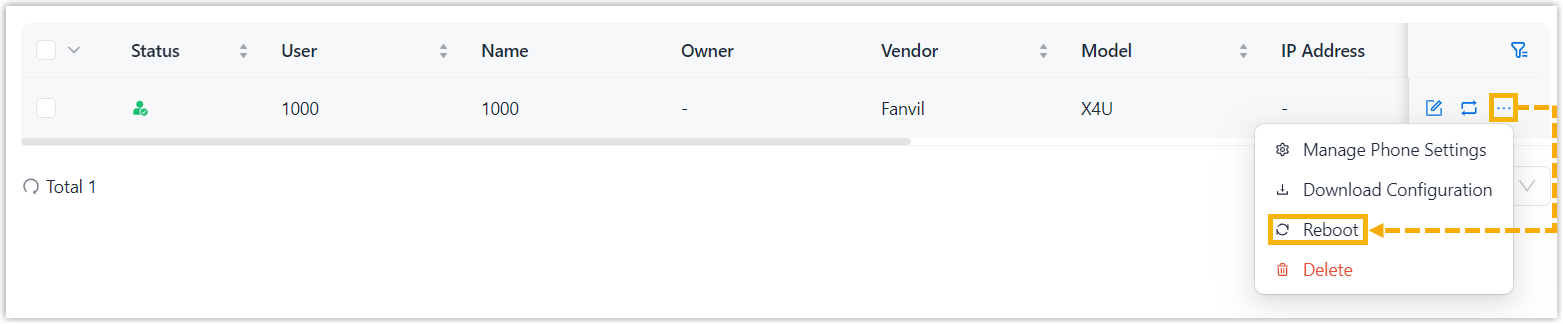
The BLF key is assigned to the IP phone. When the monitored user extension receives an incoming call, the BLF key flashes red.
- Press the BLF key to pick up the ringing call for the extension.
- Assign a BLF key for a user.
- Result
-
- A call is established between the caller and the user who performs the pickup.
- The endpoint where the original callee extension is registered displays a missed call.