Configure Call Forwarding Based on Presence Status
This topic describes how to configure presence-based call forwarding rules for users, allowing incoming calls to be automatically forwarded to the configured destination based on user's presence status.
Procedure
- Log in to NovoOne Tenant portal, go to .
- Click
 beside the
desired user.
beside the
desired user. - In the Presence tab, select the presence status for
which you want to configure call forwarding rules.

- In the Call Forwarding section, configure call
forwarding rules.
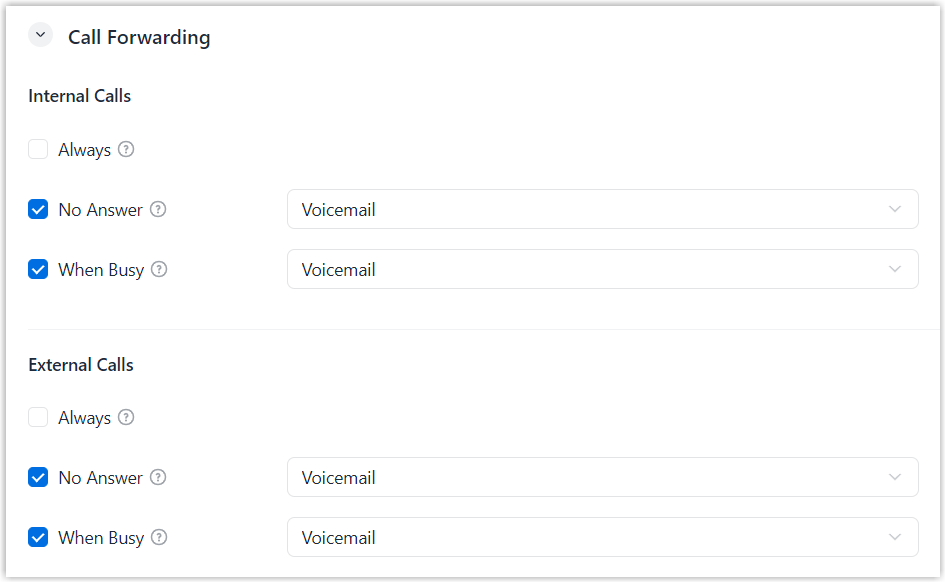
- Locate the type of incoming calls.
- Internal Calls: Configure call forwarding rules for calls from internal users.
- External Calls: Configure call forwarding rules for calls from external callers.
- Select the forwarding condition.
- Always: Forward all incoming calls to the selected destination.
- No Answer: Forward unanswered calls to the selected destination.
- When Busy: Forward the calls that come in while the user is on another call to the selected destination.
- Select a call forwarding destination.
- Hang Up
- User
- User Voicemail
- IVR
- Ring Group
- Queue
- Mobile Number
- External Number
- Locate the type of incoming calls.
- Click Save.
Result
The call forwarding rules take effect when the user is in the corresponding presence status.