Yeastar P-Series Appliance Edition 37.21.0.117 V22.3
This topic outlines the release history of firmware version 37.21.0.117, from the beta stages to the final release.
- To try out the new updates, check for firmware updates from PBX admin portal or download the firmware from Yeastar Official Website , and upgrade your phone system.
- For details on the new features and improvements in Linkus UC Clients and 'Yeastar Linkus for Google' Chrome extension, see Linkus Release Notes.
- If you found something that doesn't work as expected, you can submit feedback directly from here.
Firmware 37.21.0.117
Release date:January 29, 2026
Release version:V22.3-GA
Base version:37.21.0.117-beta1
This firmware version has officially transitioned from Beta to General Availability (GA) and is now ready for production use.
Firmware 37.21.0.117-beta1
Release date:January 13, 2026
Release version:V22.3-Beta
Base version:37.21.0.66
New features
- Theme Mode
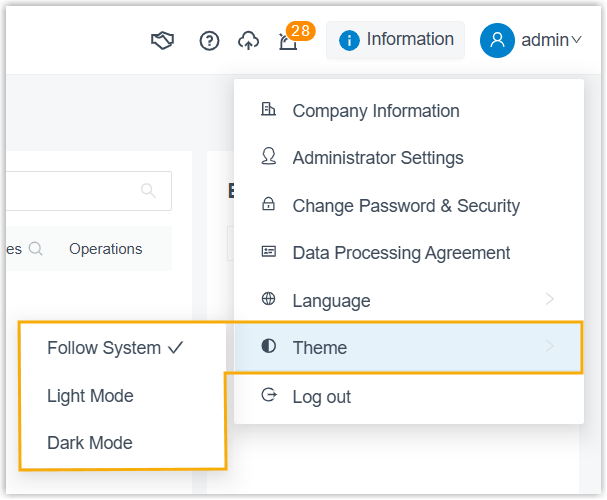
- Yeastar P-Series PBX System supports theme mode switching.
- By default, the PBX web interface automatically follows the theme
setting of your web browser. You can manually switch the theme mode to
Light Mode or Dark
Mode based on your preference.
- Encrypted Tunnel for Linkus Mobile Communication
-
Added support for establishing an encrypted tunnel between Yeastar P-Series PBX System and Linkus Mobile Client for transmitting all SIP signaling and RTP media streams. By encapsulating VoIP traffic through a dedicated tunnel port, this feature enhances communication security and effectively prevents carrier SIP blocking, thereby ensuring that extensions can register normally and maintain call stability in restricted network environments. The main impacts of this feature are as follows:
Feature Description Service Port Added a service port, which defaults to 1090and cannot be changed (Path: ).If users remotely access Linkus Mobile Client via public IP address or a NAT-mapped domain, you should set up port forwarding for this tunnel port to ensure the traffic is routed correctly.
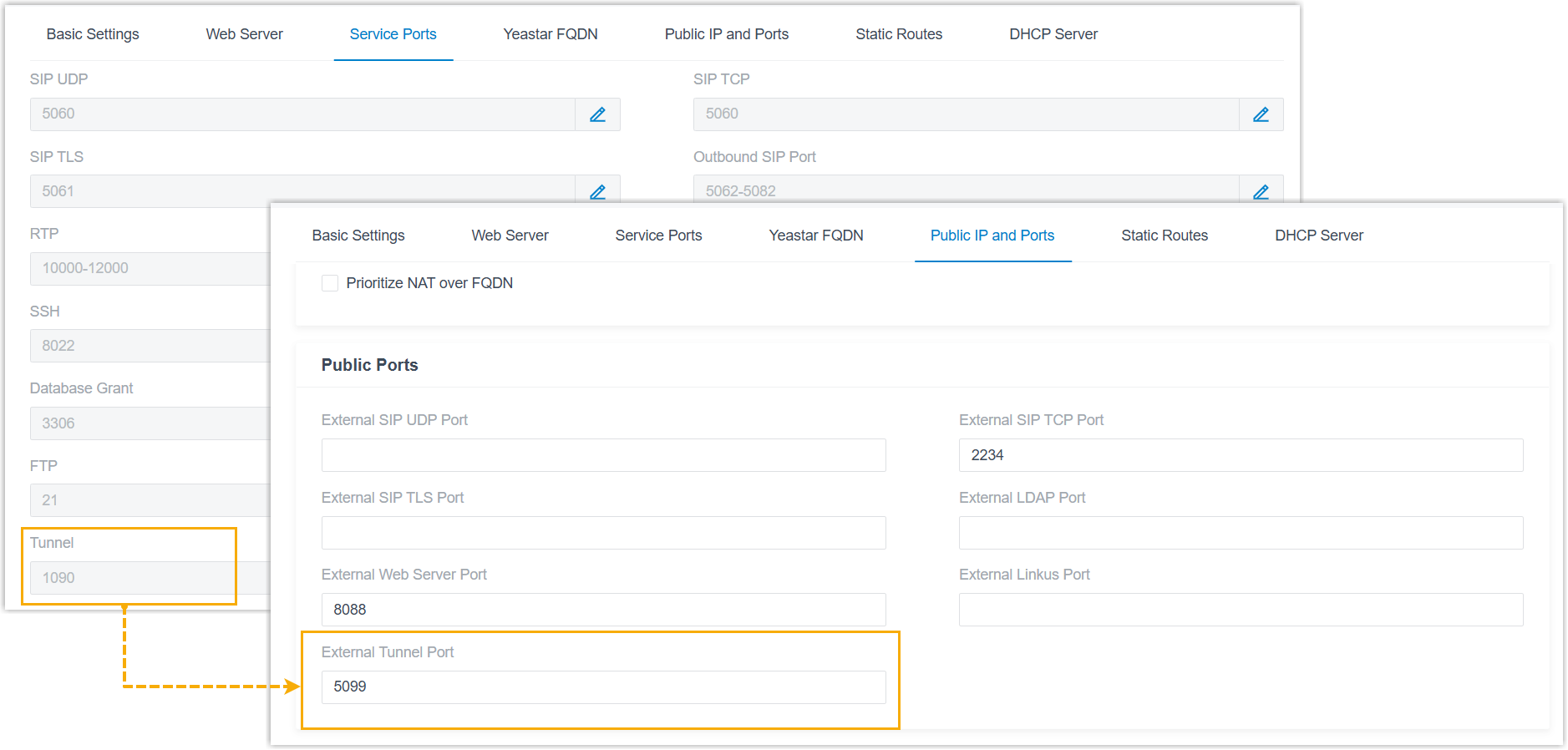 Note: If using the Yeastar FQDN, the PBX and the Linkus Mobile Client automatically communicate through the tunnel, and no manual port forwarding configuration is required.
Security Rule Added support for configuring static defense rules or auto defense rules for the Tunnel service (Path: ).  Note: To achieve this, extension users should also upgrade their Linkus Mobile Client to the following versions:
- Linkus iOS Client: Version 5.22.15 or later
- Linkus Android Client: Version 5.22.10 or later
- Advanced CDR & Call Report
- Restructured the CDR and Call Report features to provide unified call logging, richer call details, and more flexible call report management.
- The changes described below apply only to CDRs and call reports
generated after this version.Note: CDRs and call reports generated before and after this version are accessed through separate paths.

Historical CDRs and the associated call report data will be gradually deleted according to the CDR automatic cleanup rules. Once all historical data has been cleared, the corresponding legacy entry will no longer be available.
- Added a dedicated CDR Details page for individual CDR
records (accessible on Reports and Recordings > CDR > CDR (Advanced) > Operations >
 ).
).
This page provides a comprehensive and centralized overview of a complete call, including basic call information, recordings, complete call legs, call notes, and a visual time breakdown.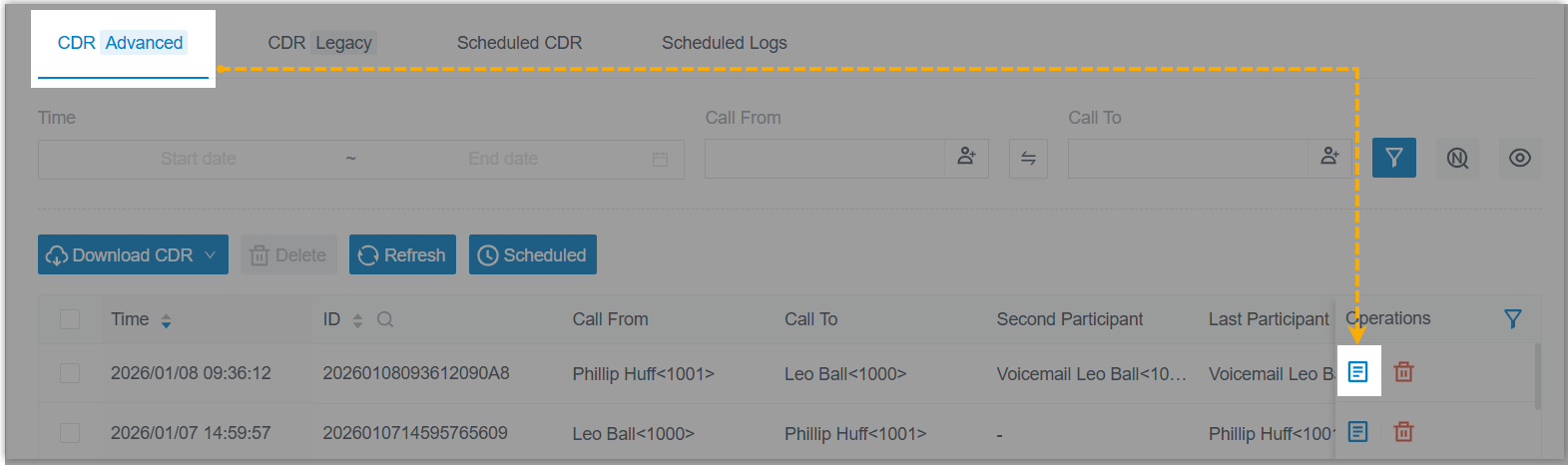
For more information, see Key Metrics for CDR Details.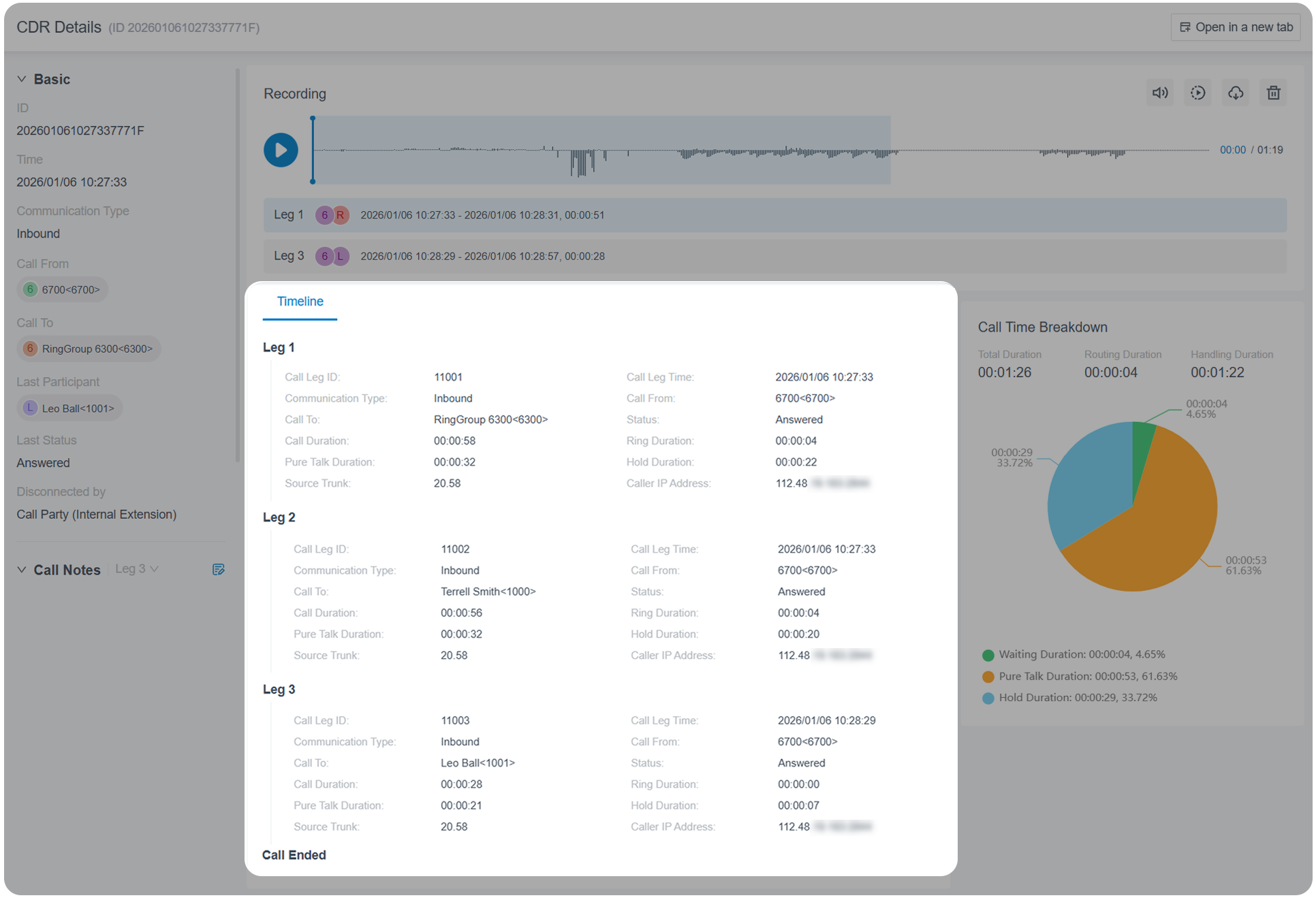
- Added support for Timeline feature. When
enabled, the CDR details view presents a chronological timeline
of all events from call start to end, providing granular
visibility into the call activity.Note:
- Only P560 and P570 support the timeline feature.
- This feature requires a subscription of Enterprise Plan or Ultimate Plan.
For more information, see Enable Call Timeline for CDR.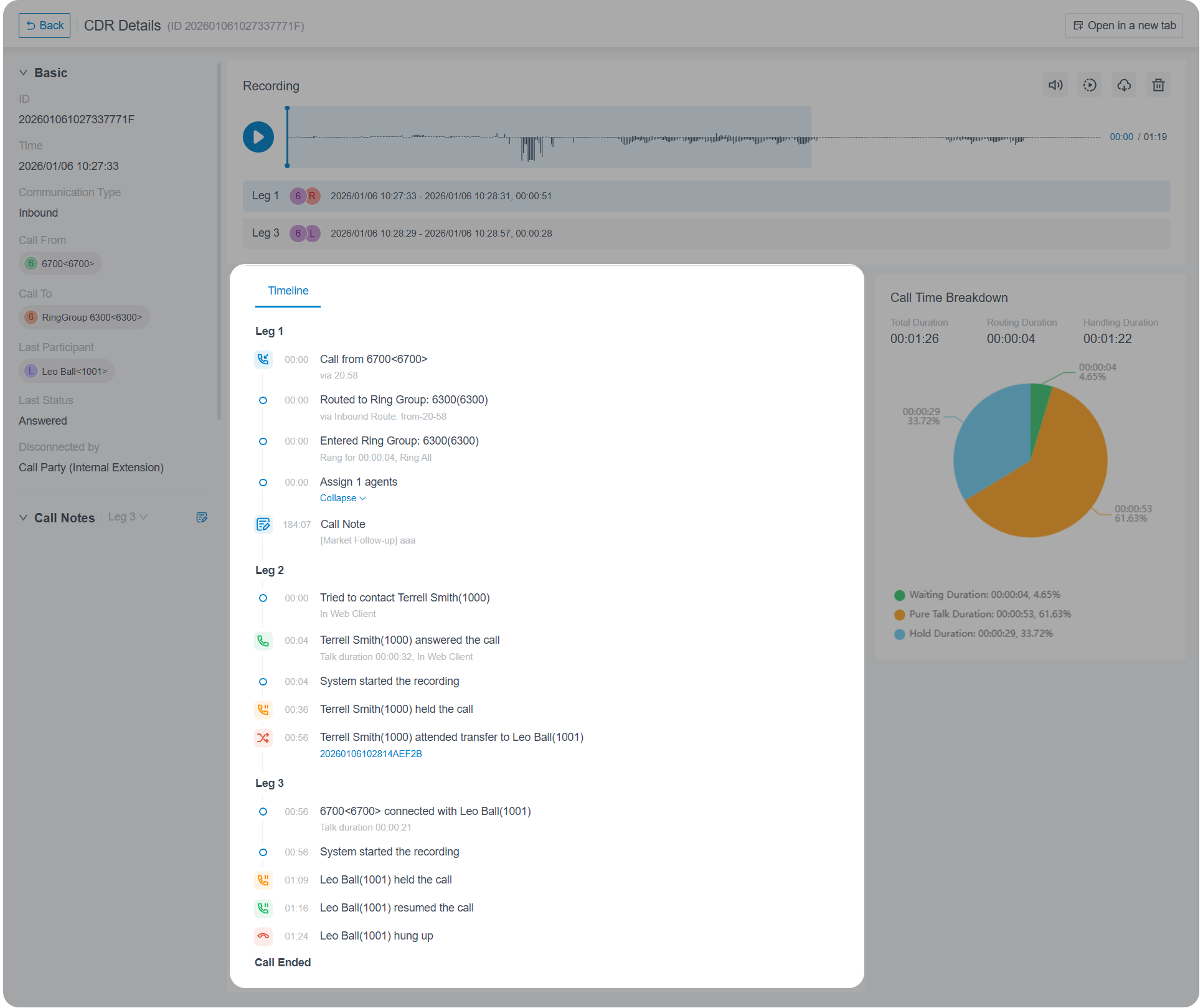
- Optimized CDR filtering: You can save frequently used filter
criteria as a custom view for instant access to relevant
CDRs.Note: Up to 10 custom views are supported.
For more information, see View CDR.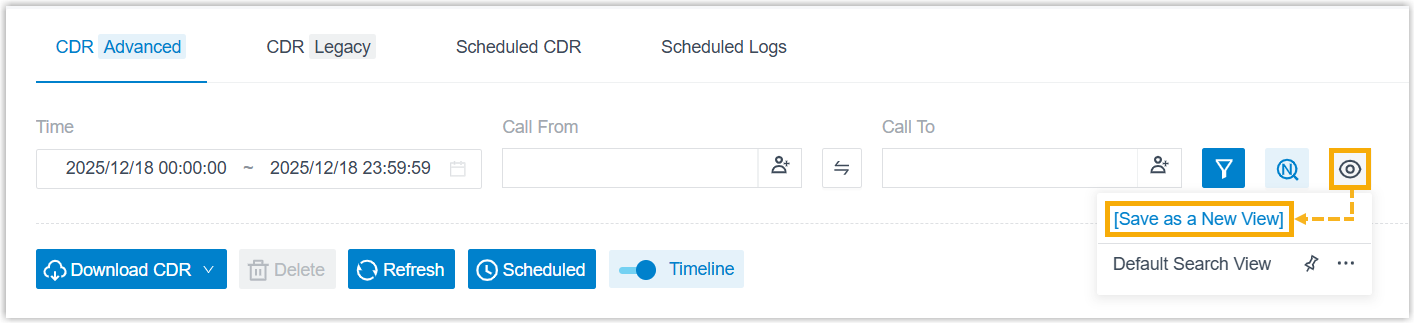
- Optimized CDR exporting:
- Added support for customizing download settings, which
will be applied when downloading CDRs from the CDR
list.
For more information, see Customize CDR Download Settings.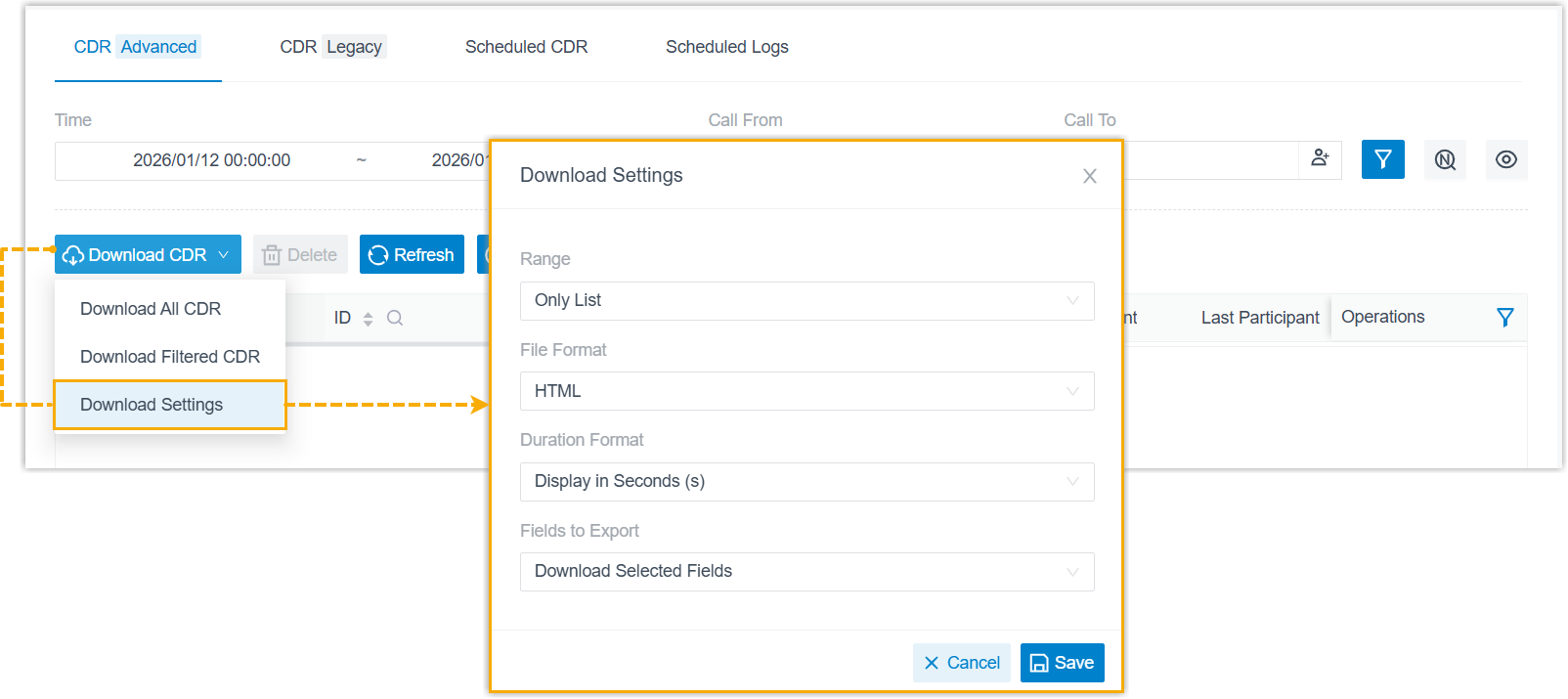
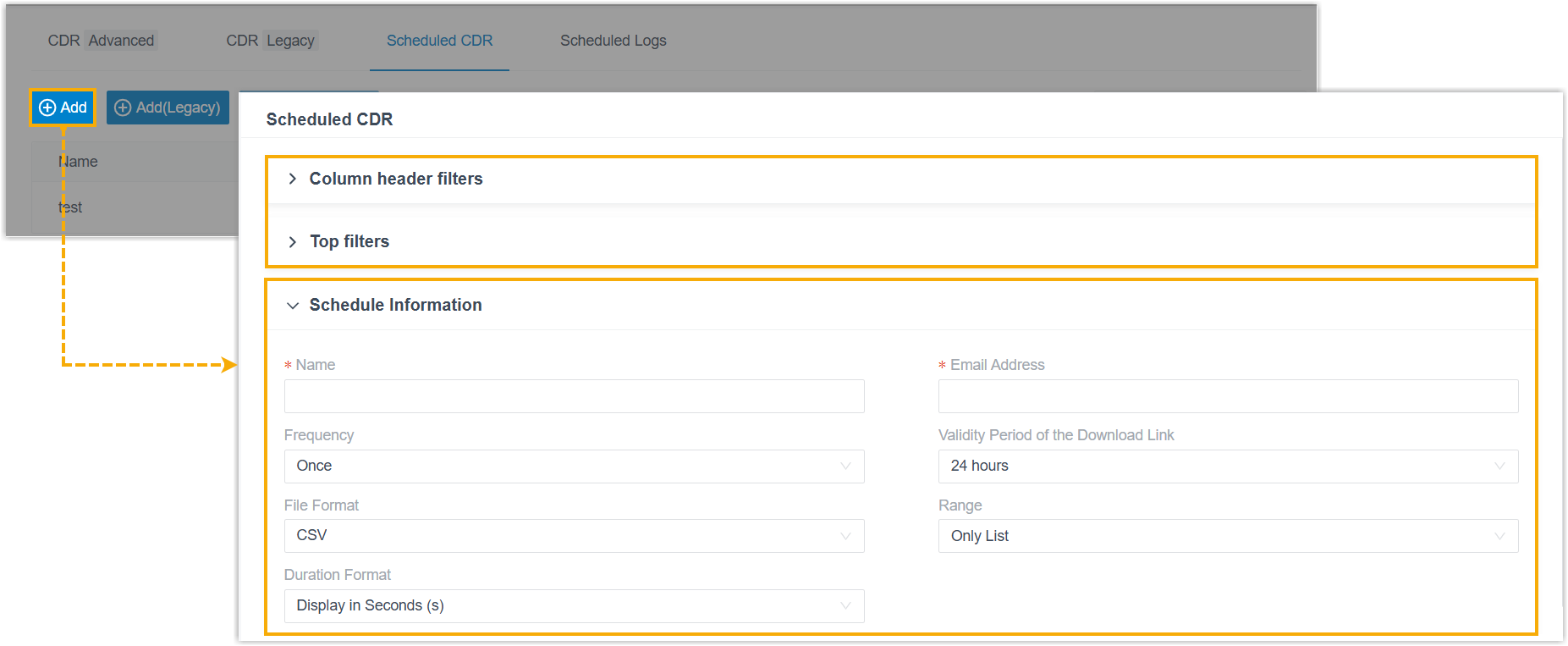
- Optimized the scheduled CDR task settings (Path: ), which provides modular filter
configurations and schedule settings for exporting.Note: Scheduled tasks for CDRs generated before or after this version are accessed through separate path. The task settings for historical data remain unchanged and can be accessed using the Add (Legacy) button.
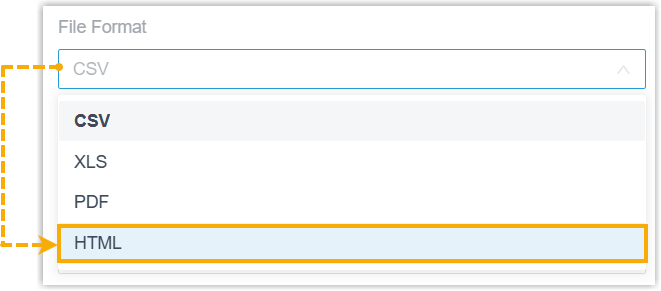
- Added support for exporting CDRs in HTML format,
available for both direct CDR download from the web
portal and scheduled CDR delivery.
- Added support for customizing download settings, which
will be applied when downloading CDRs from the CDR
list.
- Optimized the functional logic for CDR and call report
management. A comparison of the key logical changes is
provided in the table below:
Item Before this version After this version CDR Logging Structure Multi‑phase calls (e.g. queue calls, transferred calls) were split into separate records. A single CDR comprehensively records all legs of a complete call and includes Timeline‑based detailed information (including basic call information, recordings, complete call legs, call notes). Auto Cleanup - Counting Basis: CDR was counted per call leg.
- Cleanup Rule: When the number of CDR reaches the limit, the oldest CDR was deleted.
- Counting Basis: CDR is counted per complete call.
- Cleanup Rule: If legacy CDR data exists
after upgrading the PBX to this version, the
PBX
will gradually clear the historical data.
When the total number of new and legacy CDRs reaches the limit, the PBX deletes legacy CDRs at a 1:5 ratio (i.e., one new CDR triggers the deletion of 5 legacy CDRs). This process repeats until all legacy CDRs are cleared.
Event Notifications / Added the following event notifications: - Legacy CDR Will Be Cleaned Up Gradually - After upgrading the PBX to this version, if legacy CDR data exists, this event notification will be triggered to indicate that there is legacy CDR data and will be gradually cleared by the system.
- Legacy CDRs Have Been Fully Cleaned Up - Triggered when all legacy CDR data has been deleted.
Call Report Storage Mechanism Call report data was stored together with CDR. Call report data is decoupled from CDRs with independent storage. Auto Cleanup Call report data was removed together with CDRs. Call report data is removed based on its own auto-cleanup policy (Path: ). For more information, see Call Reports Auto Cleanup.
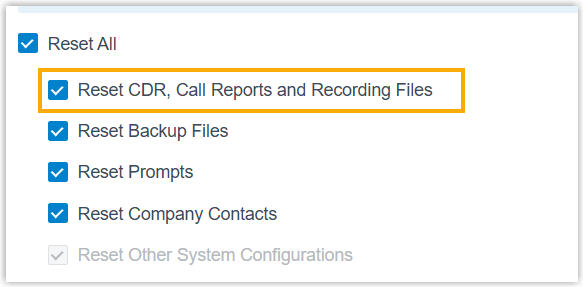
- Optimized the Reset setting: Changed
the reset option Reset CDR and Recording
Files to Reset CDR, Call Reports
and Recording Files to adapt to the
restructured CDR and call reports.
- Optimized the API interface for the following features to adapt
to the restructured CDR and call reports:
Feature Description CDR - CDR filtering: Added a request
parameter
fromfor interfacecdr/listto filter CDRs generated before or after this version. - New CDR identification: Added a
response parameter
new_idfor interfacescdr/listandcdr/searchto identify CDRs generated after this version. - Fuzzy search for new CDR: Added a
request parameter
enb_new_cdr_fuzzy_searchfor interfacescdr/getoptionandcdr/updateoptionto query or configure the fuzzy number matching setting for CDRs generated after this version.
Call report Introduced Call Report API v2.0 for accessing call report data generated after this version. The API endpoints (URL paths) are identical to those in v1.0, and only the version identifier in requests is updated (from v1.0tov2.0).Note: The original v1.0 API interfaces remain available for accessing legacy call report data generated before this version.For more information, see Developer Guide - Call Report. - CDR filtering: Added a request
parameter
- Added a dedicated CDR Details page for individual CDR
records (accessible on Reports and Recordings > CDR > CDR (Advanced) > Operations >
- Virtual Fax Integration
- Added support for the integration with the online fax service provider IXICA, enabling your team to securely send and receive faxes over the Internet via Linkus Desktop or Web Client, without relying on physical fax machines.
- Omnichannel Messaging
- Added support for the SMS messaging integration with Alhambra IT
and Aspsms, which allows business to set up SMS messaging
channels for these service providers on Yeastar P-Series PBX System.
For more information, see Set up Message Channels.
Improvements and bug fixes
- Trunk
- Added a configuration item Ignore 100 Trying Response for Register Trunk and Account Trunk (Path: ).
- Auto Provisioning
-
- Added support for synchronizing PBX contacts to the remote phonebook of auto-provisioned Fanvil IP phones via XML, allowing users to query and call PBX contacts directly from their phones.
- Optimized the BLF for DOD management: In addition to monitor whether a specific DOD is currently set as default for a specified extension, users can press the key to directly set that DOD as default.
- Fixed the auto provisioning issue: Auto provisioning failed when
the name of the assigned extension contained the character
&.
- Inbound Route
- Fixed the inbound route issue: The default destination of an inbound route (based on custom time periods) was set to a call flow, but after the time condition was switched via a feature code, inbound calls to the route would fail.
- Feature Code
- Fixed the following feature code issues:
- The PBX played an incorrect prompt indicating that call forwarding was enabled when an extension user dialed the feature code to disable call forwarding.
- When an extension user dialed a feature code to forward an inbound call to an external number, the caller heard a ringback tone instead of a busy tone.
- Recording
-
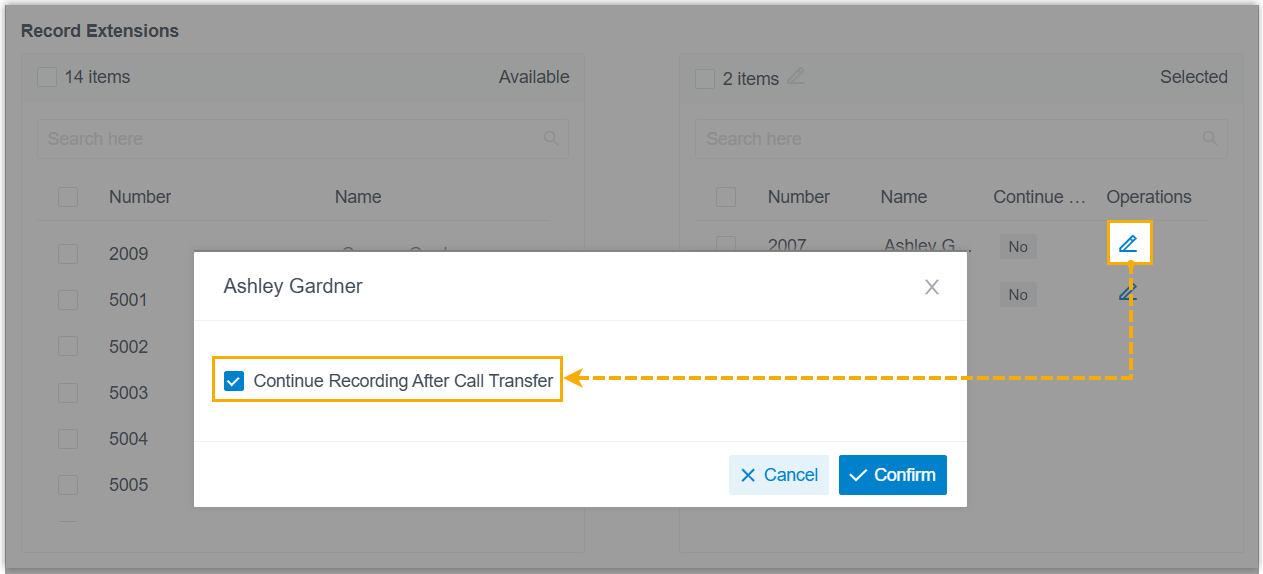
- Added a configuration item Continue Recording After
Call Transfer (Path: ), which allows you to configure whether to
continue recording an incoming call when it is transferred
(either via blind or attended transfer) from a specific queue or
extension to another destination.
For more information, see Set up Call Recording.
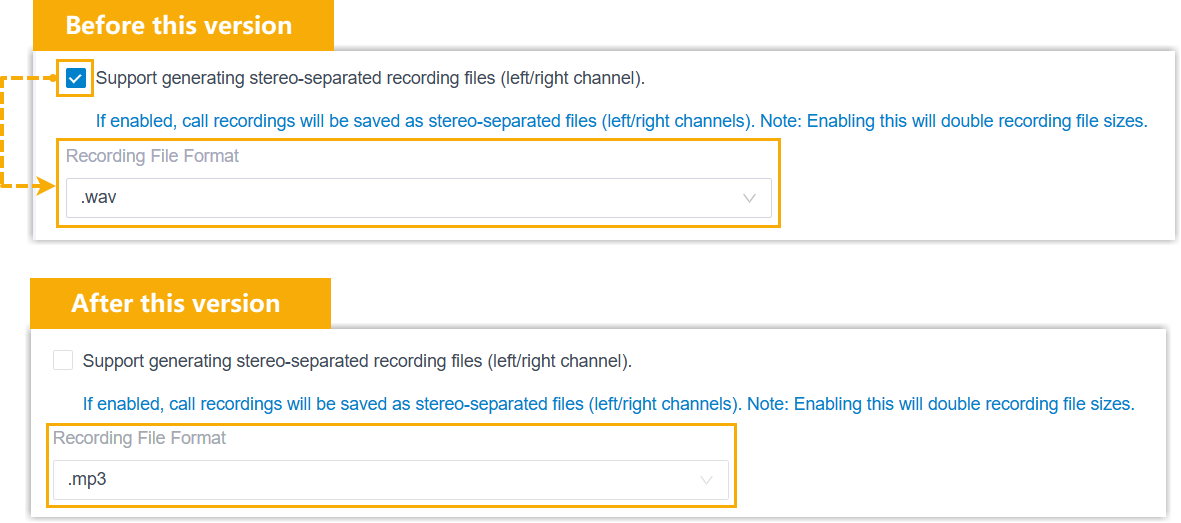
- Optimized the recording file format configuration: The
Recording File Format setting is now
always available (Path: ), regardless of the enablement status of
stereo-separated recording feature.
- Added a configuration item Continue Recording After
Call Transfer (Path: ), which allows you to configure whether to
continue recording an incoming call when it is transferred
(either via blind or attended transfer) from a specific queue or
extension to another destination.
- Preferences
- Optimized the extension preference settings: The maximum number of call
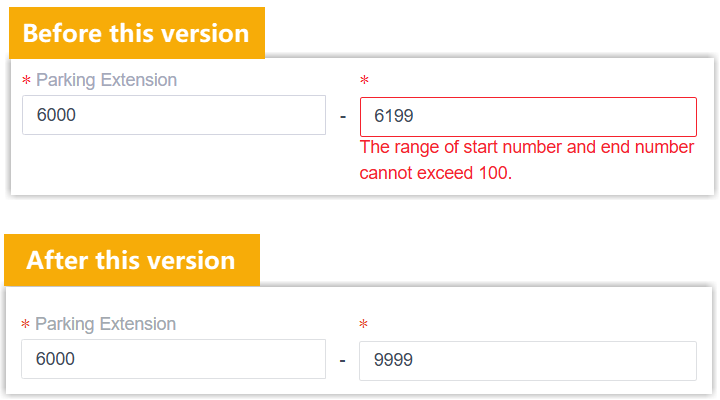
parking extensions is increased from 100 to 10,000 (Path: ).
- Archive
-
- Optimized the retention settings for archive task (Path: ), allowing you to configure retention policy for
files/folders on archive server.Note:
- The settings are available only when you schedule a archive task on a recurring basis.
- To achieve this, make sure that the user account used to connect to the archive server has file deletion permission.

Retention Type Description Retention by Quantity (formerly File Overwrite) Configure the retention unit (files/folders) and the maximum quantity. When the limit is reached, the system will automatically delete the oldest files/folders from the archive server.
Retention by Days Configure the retention unit (files/folders) and the maximum days. The system will automatically remove files/folders that exceed the configured maximum retention days (based on archive time) from the archive server.
- Optimized the recording archive task setting: The Recording File Format setting is always available regardless of the enablement status of stereo-separated recording feature.
- Fixed the archiving issue: Failed to archive backup files to an FTP server.
- Optimized the retention settings for archive task (Path: ), allowing you to configure retention policy for
files/folders on archive server.
- System Log
-
- Optimized the following system log settings:
- Added an option CDR Log for log level (Path: ), which determines whether to record CDR‑related information in the system logs.
- Added a new log category
analytics.log. If the Debug log level option is enabled, system events related to CDR data processing will be recorded in the dedicatedanalytics.logfile.
- Optimized remote syslog settings: Added syslog categories
cdrlog.logandanalytics.log(Path: ), which include logs about CDR events and CDR data processing.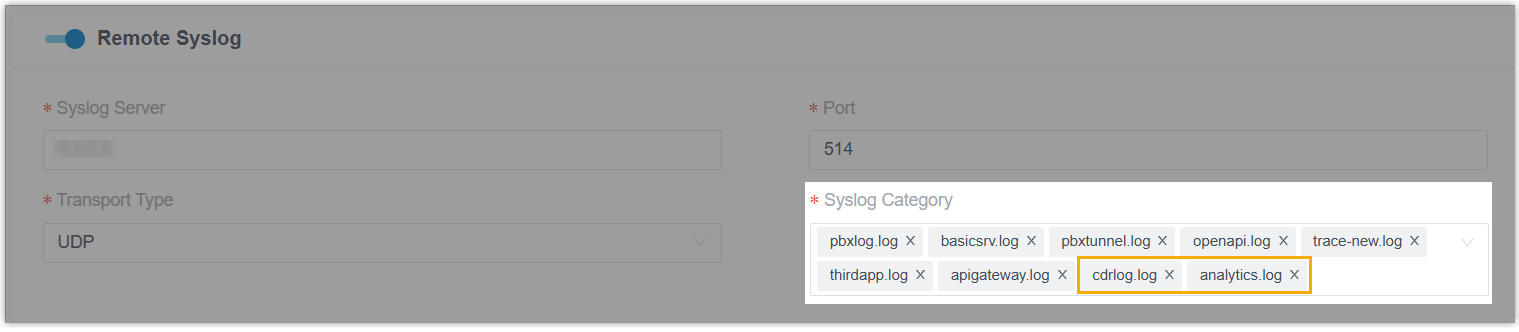
For more information, see Forward System Logs to a Third-party Syslog Server.
- Optimized the following system log settings:
- Google Workspace Integration
- Optimized user synchronization settings: Added a
Map setting, allowing you to map
corresponding Google user attributes to specific PBX user fields for
precise user data synchronization.
For more information, see Synchronize Users from Google Workspace to Yeastar P-Series PBX System.
- Microsoft Entra ID (Azure AD) Integration
- Fixed the contact synchronization issue: The PBX failed to synchronize all specified Microsoft contacts in a single operation.
- Custom CRM Template Integration
- Fixed the integration issue: When using Bearer Token authentication method, the PBX incorrectly called the refresh token endpoint instead of the token acquisition endpoint during the initial authentication, causing authentication failure.
- API
-
- Optimized the API interfaces for the following features.
Feature Description Trunk Added a parameter ignore_100_responsefor interfacestrunk/get,trunk/query,trunk/create, andtrunk/update, which can be used to query or configure whether PBX will ignore incoming100 Tryingresponse on register trunk or account trunk.Auto Recording Added a parameter enb_continue_record_on_transferfor interfacesautorecord/getandautorecord/update, which can be used to query or configure whether to continue recording an incoming call when it is transferred (either via blind or attended transfer) from a specific queue or extension to another destination.CDR - Added a parameter
pincodefor interfacescdr/listandcdr/search, which can be used to filter CDRs by PIN code, or query the PIN code used when making outbound calls via restricted outbound routes. - Added request parameters
pageandpage_sizefor interfacecdr/searchto support paginated queries.
- Added a parameter
- Fixed the API event issue: Event
30013(Call Transfer Report) was missing after an extension performed a blind transfer on an inbound call.
- Optimized the API interfaces for the following features.
- Linkus Web Client
-
- Added support for extension users to set the theme mode for
their Linkus Web Client.
By default, the Linkus Web Client automatically follows the theme setting of the user's web browser. Users can also manually switch the system theme to Light Mode or Dark Mode according to their preference.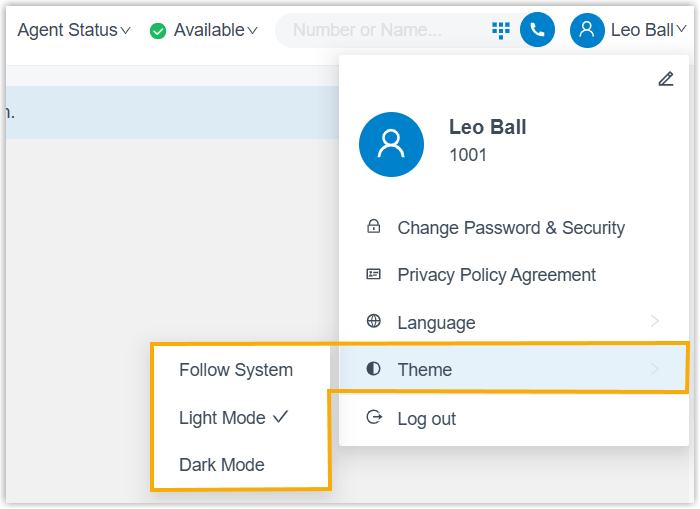
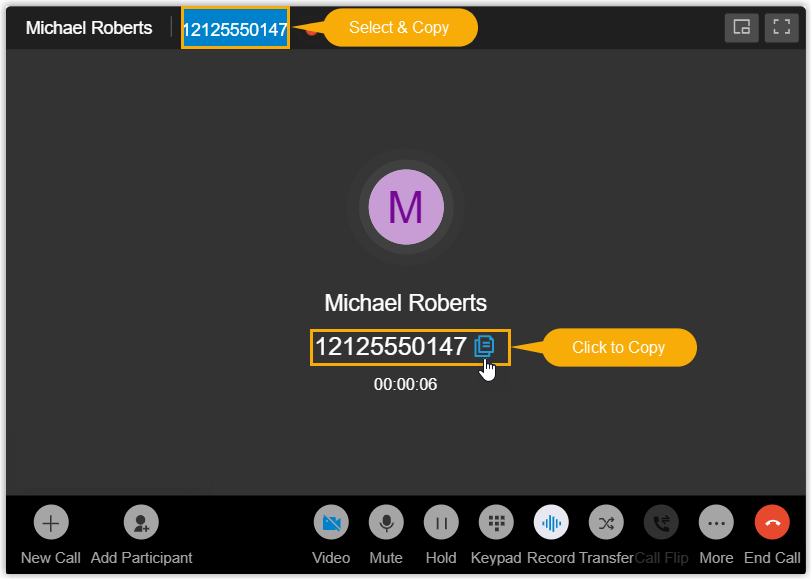
- Optimized call experience: The call window displays the caller
ID of the other participant(s) and allows extension users to
conveniently copy it by either of the following methods:
- Click to Copy: Click the button beside the number to copy it.
- Select & Copy: Select the number and use keyboard shortcut to copy it.
- Fixed the video conference issue: All video feeds appeared mirrored in the conference.
- Added support for extension users to set the theme mode for
their Linkus Web Client.