Web Access Security
To ensure the web access security, it is recommended to regularly change the login password.
There are two ways to change the web login password.
- Manually modify the password
-
- In the PBX web interface, click your account at the top-right corner,
then click My Settings.
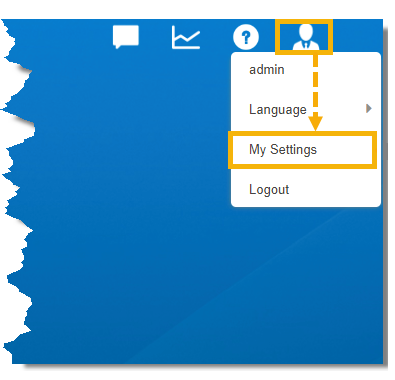
- In My Settings pop-up window, do as follows to
change the password.
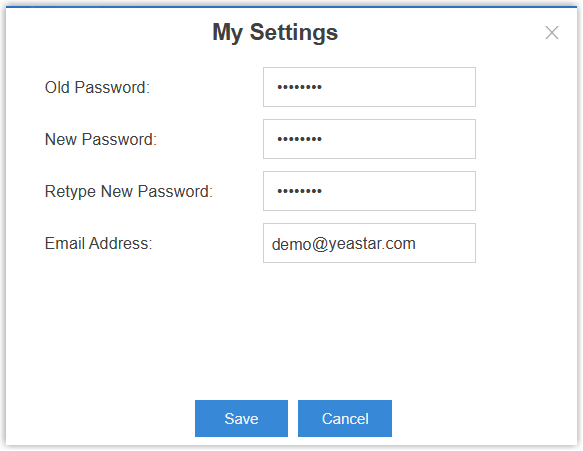
- In the Old Password field, enter your old password.
- In the New Password field, enter the new
password.Note: The new password should meet the following requirements depending on whether the Allow Weak Password option is enabled (Path: ).
Strong password (The "Allow Weak Password" option is disabled)
Basic password (The "Allow Weak Password" option is enabled)
- At least 10 characters
- At least 1 uppercase letter
- At least 1 lowercase letter
- At least 1 digit
- Consecutive numbers are not allowed (e.g.,
4567)
- At least 8 characters
- At least 1 uppercase letter
- At least 1 lowercase letter
- At least 1 digit
- In the Retype New Password field, re-enter the new password.
- In the Email Address field, enter a valid email address, which is used to receive password reset emails when you forget it.
- Click Save.
- In the PBX web interface, click your account at the top-right corner,
then click My Settings.
- Forced to change the password after login
- When you log in the PBX web interface using a weak password with the
Allow Weak Password option disabled (Path: ), a password change window automatically pops up. You need to
change the weak password to a strong one to proceed.
In the password change window, do as follows:
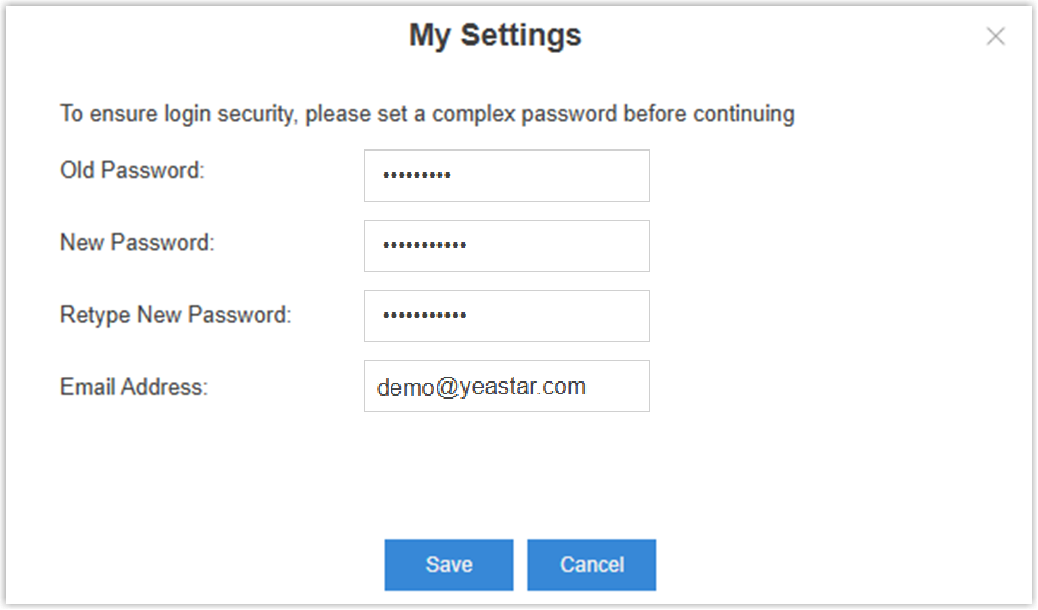
- In the Old Password field, enter the old weak password.
- In the New Password field, enter the new
password.Note: The new password should meet all the following requirements.
- At least 10 characters
- At least 1 uppercase letter
- At least 1 lowercase letter
- At least 1 digit
- Consecutive numbers are not allowed (e.g.,
4567)
- In the Retype New Password field, re-enter the new password.
- In the Email Address field, enter a valid email address, which is used to receive password reset emails when you forget it.
- Click Save.