AI Transcription Overview
Yeastar P-Series PBX System supports AI transcription for voicemails, which can convert voicemail messages into readable text using the built-in AI engine or third-party AI services, allowing users to quickly review voicemail messages.
Requirements and restriction
- Requirements
Item Requirement Firmware 37.23.0.83 or later. Subscription Enterprise Plan or Ultimate Plan
Note:- The AI Transcription feature includes one-time free minutes for built-in transcription service with your plan subscription (120 minutes for Enterprise Plan or 240 minutes for Ultimate Plan).
- To expand AI transcription minutes for
built-in transcription service, subscribe to the
Transcription add-on
service (Path: ).

- Restriction
- AI Voicemail Transcription can NOT be used simultaneously with the Legacy Google Cloud
Speech-to-Text API integration.Note: Starting from version 37.23.0.83, the legacy Google Cloud Speech-to-Text API integration will no longer be maintained. For better security, it is recommended to disconnect the existing legacy integration and migrate to AI Voicemail Transcription, which is based on the latest Google Cloud Speech-to-Text API (v2).
Highlights
- Instant & accurate transcription
- Deliver accurate voicemail-to-text conversion, allowing users to easily review and prioritize important messages.
- Effortless transcript review & adjustment
- Allow users to easily review, edit, and fine-tune the AI-generated transcripts to clarify information, add personal notes and clear key points.
- Flexible transcription modes
- Support both automatic and manual transcription modes, allowing users to choose whether to transcribe voicemails automatically or only when needed.
- Multi-language support
- Provide multiple languages for transcribing of voicemails. Extension users can set their preferred transcription language individually.
- Various transcription services
-
Support AI transcription powered by the built-in AI engine or third-party AI services (provided by Amazon, Elevenlabs, OpenAI, Google). This allows you to select the preferred transcription service provider based on your transcription budget and functional capabilities of different AI services, achieving more cost-effective, more secure and more accurate transcription.
Guidances
- Configure AI transcription feature
-
- Enable and configure AI transcription feature
Enable the AI transcription feature for the system. Choose the desired transcription service (the PBX's built-in AI engine or third-party AI services), set the desired transcription language and specify which extensions are allowed to use the transcription feature.
For more information, see the following topics: - Customize AI transcription for extensionsAfter transcription enabled, voicemail messages for authorized extensions can be transcribed into readable text. You can configure the transcription mode (either automatic or manual) and preferred transcription language for each extension individually.Note: Authorized extension users can customize the AI transcription configuration directly from their Linkus Clients. These settings will be automatically synchronized between the PBX and the user’s Linkus Client.
For more information, see Configure AI Voicemail Transcription for an Extension.
- Enable and configure AI transcription feature
- Track AI transcription usage
- You can track the usage of AI transcription (powered by the PBX's built-in
AI engine) using one of the following methods.
- View used transcription minutes from the Transcription Usage Details report. For more information, see Access Transcription Usage Details Report.
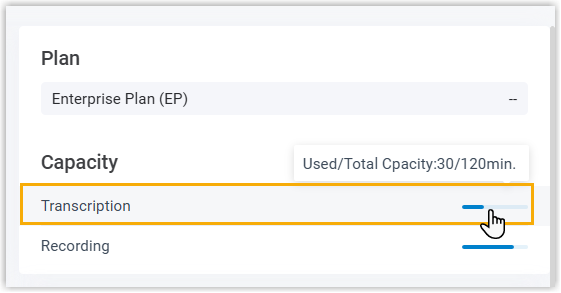
- View used transcription minutes and total capacity directly from the
Dashboard (Only visible to super
administrator account).