Upgrade Firmware of Provisioned Phones
You can upgrade the firmware on provisioned phones to specified version in bulk. This topic describes how to upgrade the phone firmwares via auto provisioning.
Note:
- Once the upgrade starts, the phone will automatically reboot and stop working until the upgrade completes.
- The procedures described in this topic do not apply to Cisco IP phones. To upgrade the firmware on provisioned Cisco phones, contact Yeastar technical support.
Prerequisites
Service provider has assigned IP phone firmwares to the tenant.
Procedure
- Log in to NovoOne Tenant portal, go to .
- Select the checkboxes of the IP phones with the same model and provisioned
via the same template, and click at the top.
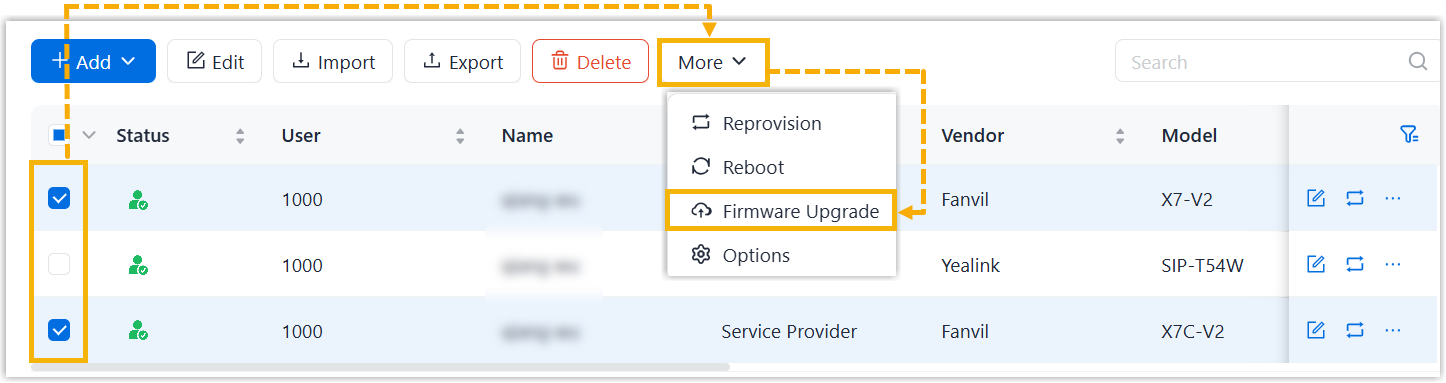
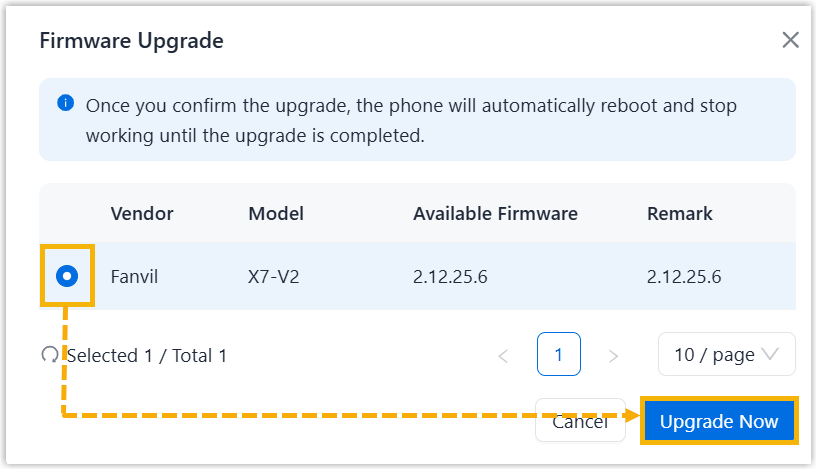
A window pops up displaying the device firmware whose vendor and model match those phones.
- In the pop-up window, select the firmware to which you want to upgrade the
phones, click Upgrade Now.
Result
All selected and provisioned phones in the Phones list automatically reboot and are upgraded to the selected firmware version.