Release a User from a Provisioned IP Phone
When a user doesn't need the phone that is currently bound with him/her, you can release the user from the phone. This topic describes how to release a user from a provisioned IP phone on NovoOne Tenant.
Procedure
- Log in to NovoOne Tenant portal.
- Release the user from previous phone.
- Go to , and click
 beside the desired user.
 - Under the Phone tab, complete the following
settings.
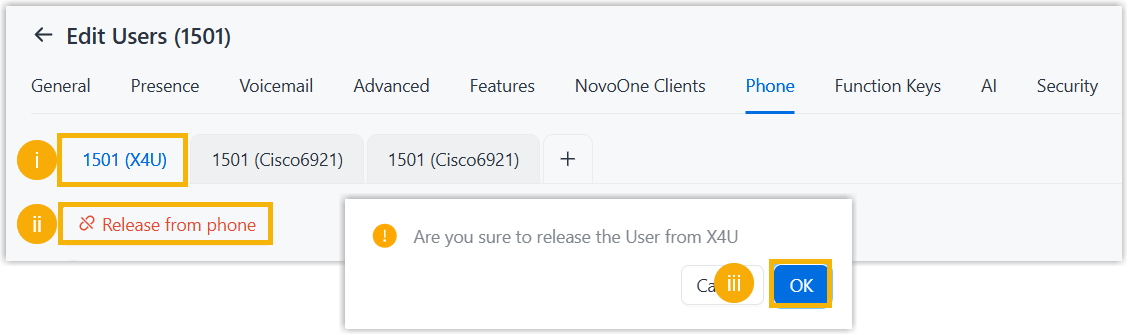
- Click the tab of unused phone.
- Click Release from phone.
- In pop-up window, click OK.
- Click Save.
The user is released from the phone.
- Go to , and click
- Reprovision the phone to de-register the user.
- Go to .
- Click
 beside the phone from which you want to
release the user.
beside the phone from which you want to
release the user. - In the pop-up window, click OK.