Configure Custom Prompt for Emergency Notification
When notifying emergency contacts by phone call, the system plays a prompt that announces the caller and the emergency number dialed. You can use the default prompt, or configure a custom prompt for emergency notifications.
Procedure
- Log in to NovoOne Tenant portal, go to .
- In the Notification Contacts tab, click
Notification Prompt.
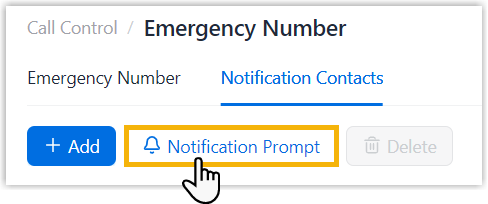
- In the pop-up window, configure emergency notification
prompt.
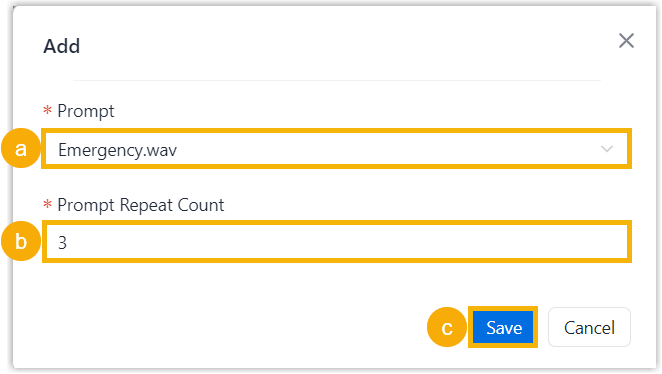
- In the Prompt drop-down list, select an
available custom prompt or click Create New
to create a prompt.Note: Available prompts are synchronized from . You can select from existing prompts, or click Create New to add a new custom prompt.
For more information, see Add a Custom Prompt.
- In the Prompt Repeat Count field, specify the number of times the prompt is played.
- Click Save.
- In the Prompt drop-down list, select an
available custom prompt or click Create New
to create a prompt.
Result
When notifying emergency contacts by phone call, the system plays the configured prompt for the specified number of times, then hangs up the call.