Route Inbound Calls Based on Time
NovoOne allows you to route inbound calls based on business hours and holidays, so calls can be handled according to your business schedule.
Prerequisites
You have added a business hours profile and defined the business hours and holidays.
Procedure
- Log in to NovoOne Tenant portal, go to .
- Click Add.
- Configure the inbound route.
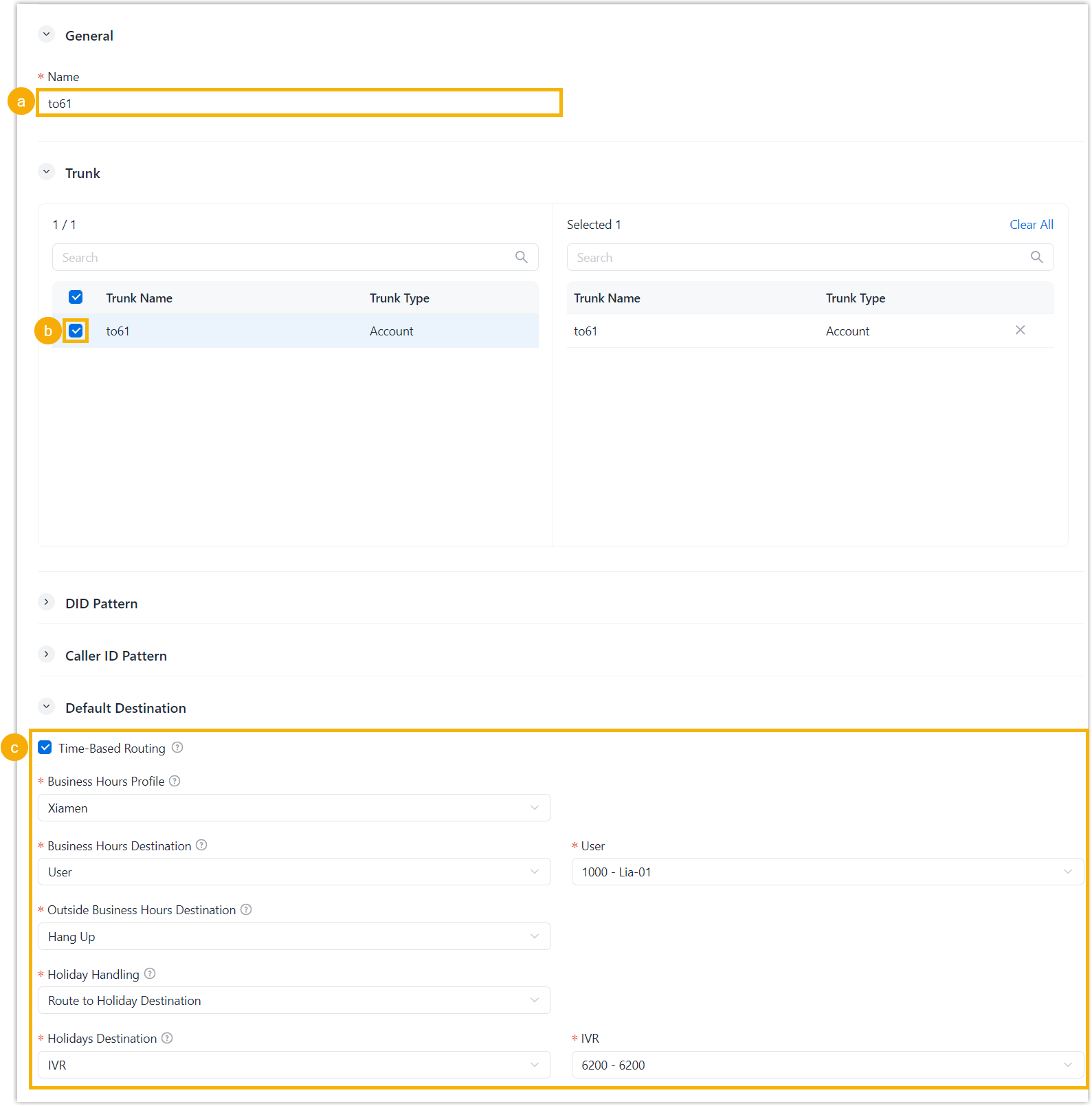
- In the Name field, enter a name to help identify the inbound route.
- In the Trunk section, select the
desired trunks to the Selected box.
Inbound calls received through the selected trunks are routed according to this inbound route.
- In the Default Destination section, select
the checkbox of Time-Based Routing and
configure the destinations.
Setting Description Business Hours Profile Select a business hours profile that defines the business hours. Outside Business Hours Destination Select the destination for calls received outside business hours. Holiday Handling Specify the routing strategy for inbound calls received during holidays. - Route to Holiday
Destination: Route inbound calls
received during holidays to a specific
destination.
If selected, select a destination from Holidays Destination drop-down list.
- Ignore Holiday: Ignore holidays and route calls based on business hours setting.
- Route to Holiday
Destination: Route inbound calls
received during holidays to a specific
destination.
- Click Save.
Result
Inbound calls are routed to different destinations according to the current business hours or holiday status.