Add a Custom Call Summary Template
After an AI-transcribed call ends, the system generates a call summary based on the transcribed content and the default call summary template. NovoOne provides several preset templates, and you can also create your own custom templates to tailor the output for different business scenarios.
Limitation
You can add up to 5 custom templates.
Supported methods
You can add a custom call summary template using either of the following methods:
Add a template from scratch
- Log in to NovoOne Tenant portal, go to .
- Click Add.
- In the right panel, configure the template settings:
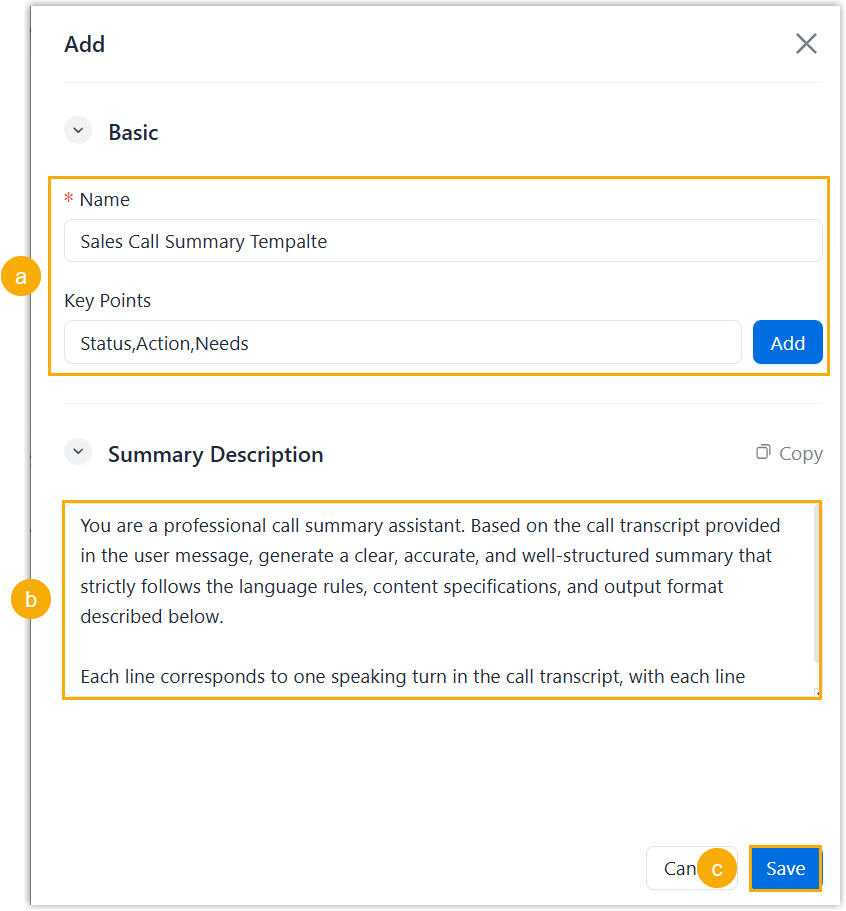
- In the Basic section, enter the basic
information for the template.
Setting Description Name Enter a name for the template. Key Points Add keywords to help quickly identify what the template is about. Note:- You can add up to 3 keywords; use commas to separate multiple key points.
- The key point is for identification purpose only and are not sent to the AI as prompts.
- In the Summary Description section, enter
a natural language description to guide the AI how to generate
the call summary.Note: The maximum length is 2048 characters.
- Click Save.
- In the Basic section, enter the basic
information for the template.
Add a template by duplicating
- Log in to NovoOne Tenant portal, go to .
- Click
 beside the desired template.
The duplicated template appears at the bottom of the list.
- Click
 beside the duplicated template.
 - In the right panel, edit the template content according to your need, then click Save.