Manage Two-Factor Authentication
This topic describes how to manage the Two-Factor Authentication (2FA) feature, including removing trusted devices, changing authentication method, and disabling the 2FA feature.
Remove a trusted device
In case you lost access to a trusted device, you can remove it from the list if necessary.
Log in to NovoOne Web Client, click your account at the top-right corner, then go to .
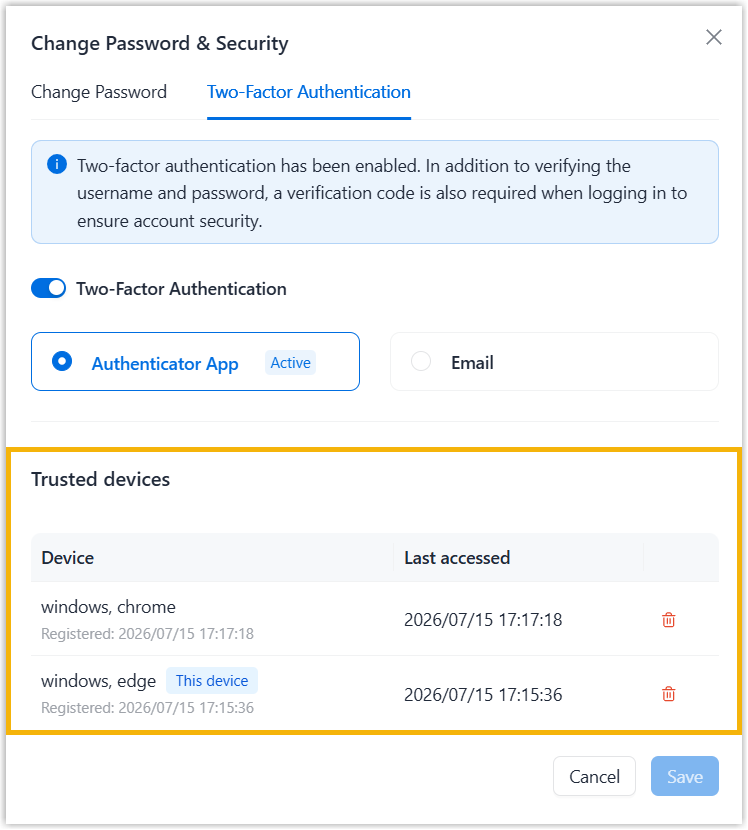
- In the Trusted devices section, click
 beside
the device that you want to remove.
beside
the device that you want to remove. - In the pop-up prompt, click Confirm.
Disable two-factor authentication
You can disable 2FA for your account at any time.
-
Log in to NovoOne Web Client, click your account at the top-right corner, then go to .
- Unselect the checkbox of Two-factor Authentication.
- In the pop-up window, enter your account password and click
Confirm to verify your operation.
The webpage prompts a message "2FA disabled", indicating that 2FA has been successfully turned off.