Variables and Functions in Yeastar Expression
This topic introduces the supported variables and functions in Yeastar Call Flow Designer.
Variable
- Session Variable: Session variables store information about the
current call session. These variables are globally accessible throughout a
call flow and do not depend on any specific components.
For more information, see Session Variables.
- Component Variable: Component variables hold the values returned by
specific components. These variables become available after the
corresponding components are added to a call flow.
For more information, see Component variables.
- Session Variables
-
Variable Type Description Example Value $Session.ani String Caller's number. "15812340987" $Session.callid String Unique ID for a call. "1751336277.2" $Session.did String The DID number associated with the call flow that the caller reached. "5503301" $Session.flowNum String The extension number associated with the call flow that the caller reached.
"6900" $Session.transferingNum String The number from which the call was forwarded.
"1000" - Component variables
-
Note: Since the same component can be added multiple times in a call flow, an index is appended to the unique ID of each component (e.g. Menu 1, Menu 2) based on the order in which the components are added. To retrieve data from the right component, the component variable must contain the corresponding index.
-
Variable Type Description Example Value Prompt component $Prompt{index}.ttsResult String The Text-to-Speech (TTS) result of the Prompt component. PromptTTSResult.Success: The text is successfully converted into speech, and the system plays it to caller.PromptTTSResult.Timeout: The text is NOT converted into speech within the timeout period, and the system routes caller directly to the next component without playing a prompt when the timeout is reached.
$Prompt1.ttsResult(STRING)=PromptTTSResult.Success Menu component $Menu{index}.result String The result of the Menu component.
MenuResult.Timeout: The caller didn't press any DTMF digit before the timeout, and was routed to the timeout destination.MenuResult.ValidOption: The caller pressed a valid key, and was routed to the corresponding destination.MenuResult.InvalidOption: The caller pressed an invalid key, and was routed to the no match destination.
$Menu1.result(STRING)=MenuResult.InvalidOption
$Menu{index}.ttsResult String The Text-to-Speech (TTS) result of the Menu component. MenuTTSResult.Success: The text is successfully converted into speech, and the system plays it to caller.MenuTTSResult.Timeout: The text is NOT converted into speech within the timeout period, and the system routes caller directly to the next component without playing a prompt when the timeout is reached.
$Menu1.ttsResult(STRING)=MenuTTSResult.Success $Menu{index}.userInput String The DTMF digit that the caller pressed, excluding the end key (set in ). "2" User Input component $UserInput{index}.result String The result of User Input component.
UserInputResult.Timeout: The caller didn't press any DTMF digit before the timeout, and was routed to the timeout destination.UserInputResult.ValidOption: The caller pressed a valid key, and was routed to the corresponding destination.
$UserInput1.result(STRING)=UserInputResult.Timeout $UserInput{index}.ttsResult String The Text-to-Speech (TTS) result of the User Input component. UserInputTTSResult.Success: The text is successfully converted into speech, and the system plays it to caller.UserInputTTSResult.Timeout: The text is NOT converted into speech within the timeout period, and the system routes caller directly to the next component without playing a prompt when the timeout is reached.
$UserInput1.ttsResult(STRING)=UserInputTTSResult.Success $UserInput{index}.userInput String The DTMF digit that the caller pressed, excluding the end key ( #or*)."2" Record component $Record{index}.ttsResult String The Text-to-Speech (TTS) result of the Record component. RecordTTSResult.Success: The text is successfully converted into speech, and the system plays it to caller.RecordTTSResult.Timeout: The text is NOT converted into speech within the timeout period, and the system routes caller directly to the next component without playing a prompt when the timeout is reached.
$Record1.ttsResult(STRING)=RecordTTSResult.Timeout Dial by Number component $DialByNumber{index}.ttsResult String The Text-to-Speech (TTS) result of the Dial by Number component. DialByNumberTTSResult.Success: The text is successfully converted into speech, and the system plays it to caller.DialByNumberTTSResult.Timeout: The text is NOT converted into speech within the timeout period, and the system routes caller directly to the next component without playing a prompt when the timeout is reached.
$DialByNumber1.ttsResult(STRING)=DialByNumberTTSResult.Success Transfer component $Transfer{index}.ttsResult String The Text-to-Speech (TTS) result of the Transfer component. TransferTTSResult.Success: The text is successfully converted into speech, and the system plays it to caller.TransferTTSResult.Timeout: The text is NOT converted into speech within the timeout period, and the system routes caller directly to the next component without playing a prompt when the timeout is reached.
$Transfer1.ttsResult(STRING)=TransferTTSResult.Success Get Extension Presence Status component $GetExtensionStatus{index}.currentProfileName String Name of the extension's current presence status.
Note: When using functions to evaluate an extension's presence status, ensure that the status constant matches one of the values defined in .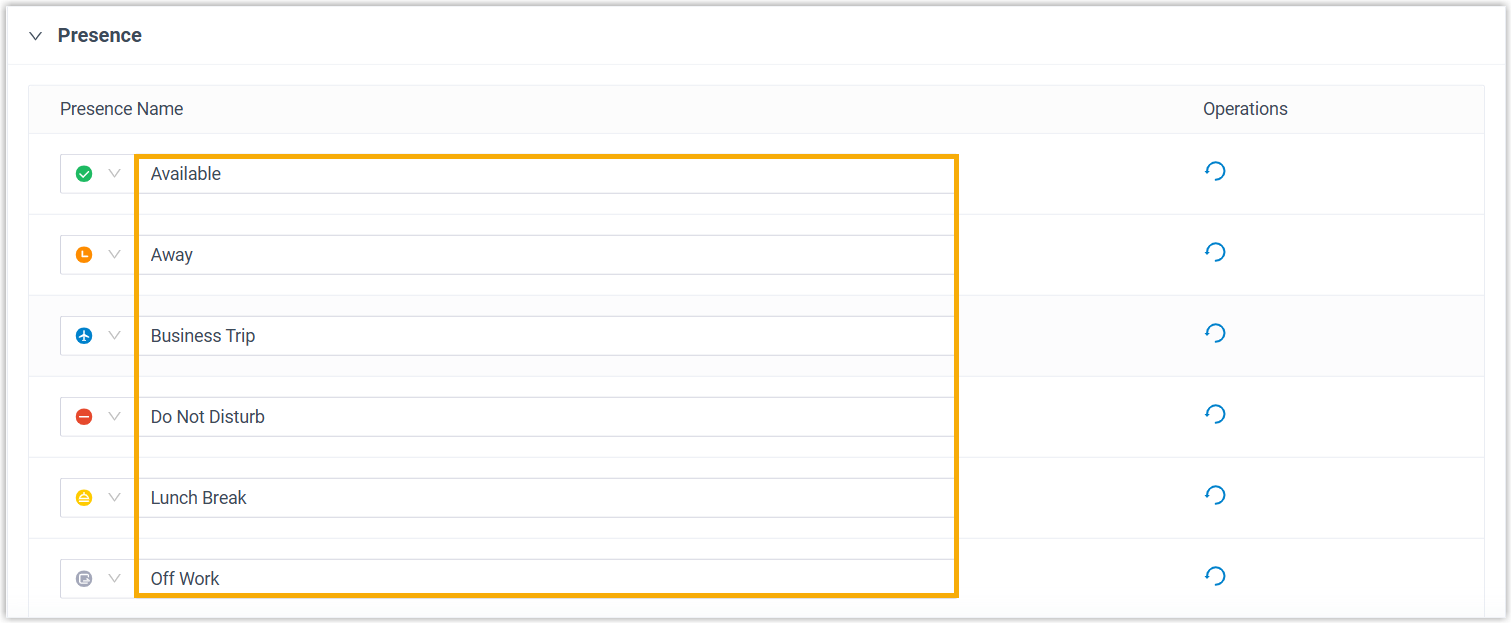
"Available" $GetExtensionStatus{index}.currentProfile String Name and additional information of the extension's current presence status. "Available,work" $GetExtensionStatus{index}.isUnavailable Boolean Whether the extension is unregistered. False $GetExtensionStatus{index}.isInCall Boolean Whether the extension is currently on a call. True: At lease one endpoint registered to the extension is on a call.False: None of the endpoints registered to the extension are on a call.
True $GetExtensionStatus{index}.isInRing Boolean Whether the extension is currently ringing. True: At lease one endpoint registered to the extension is ringing.False: None of the endpoints registered to the extension are ringing.
False Get Queue Agent component $GetQueueAgent{index}.agentList Object The list of agents with a specific status in a specific queue, returning each agent's extension number as well as their current status.
"1001,Log Out;1003,Log Out;1004,Log Out"
$GetQueueAgent{index}.agentNumberList Object The list of agents with a specific status in a specific queue, returning each agent's extension number. "1001,1003,1004" Get Queue Info component $GetQueueInfo{index}.availableAgents Integer The number of agents currently available to take calls.
5 $GetQueueInfo{index}.unavailableAgents Integer The number of agents currently unavailable to take calls.
1 $GetQueueInfo{index}.callsActive Integer The number of calls currently being answered by queue agents.
2 $GetQueueInfo{index}.callsWaiting Integer The number of calls currently waiting in the queue. 10 Get Agent Status component $GetAgentStatus{index}.currentProfile String Name and additional information of the agent's current status. Note: When using functions to evaluate an agent's status, ensure that the status constant matches one of the supported values listed below.- Status for Static Agents:
"Pause{pause_reason}"-
"Unpause"
- Status for Dynamic Agents:
"Log In"-
"Log Out" "Pause{pause_reason}"
"Log Out" $GetAgentStatus{index}.isInCall Boolean Whether the agent is currently on a call. True: The agent is on a call.False: The agent is NOT on a call.
True $GetAgentStatus{index}.isInRing Boolean Whether the agent's extension is currently ringing. True: The agent's extension is ringing.False: The agent's extension is NOT ringing.
True Get System Info component $GetSystemInfo{index}.deviceName String Device name. "PBX" $GetSystemInfo{index}.modelName String Product model. "Yeastar P550" $GetSystemInfo{index}.sn String Serial number. "3631A2124123" $GetSystemInfo{index}.firmwareVersion String Firmware version. "37.22.0.17-beta1" $GetSystemInfo{index}.systemTime String Current system time. "2026/01/30 09:46:44" $GetSystemInfo{index}.systemUptime Integer System uptime in seconds. 88606 Get System Capacity component $GetSystemCapacity{index}.extensionCapacity Integer The maximum number of supported extensions. 50 $GetSystemCapacity{index}.extensionUsed Integer The number of used extensions. 33 $GetSystemCapacity{index}.ccCapacity Integer The maximum number of supported concurrent calls. 25 $GetSystemCapacity{index}.ccUsed Integer The number of used concurrent calls. 1 Get Extension Info component $GetExtensionInfo{index}.number String Extension number. "1001" $GetExtensionInfo{index}.name String Extension name. "Phillip Huff" $GetExtensionInfo{index}.email String Extension's email address. "phillip@sample.com" $GetExtensionInfo{index}.mobileNumber String Extension's mobile number. "15880123456" Get Company Contact Info component $GetCompanyContactInfo{index}.contactName String Contact name. "Leo Poll" $GetCompanyContactInfo{index}.company String Company name. "YS" $GetCompanyContactInfo{index}.email String Email address. "leo@ys.com" $GetCompanyContactInfo{index}.phonebookList String The phonebook(s) to which the contact belongs. "All" $GetCompanyContactInfo{index}.remark String Remark about the contact. "remark" $GetCompanyContactInfo{index}.business String Business number. "01082345678" $GetCompanyContactInfo{index}.business2 String Business number. "02160123456" $GetCompanyContactInfo{index}.mobile String Mobile number. "13800001234" $GetCompanyContactInfo{index}.mobile2 String Mobile number. "15900005678" $GetCompanyContactInfo{index}.home String Home number. "01087654321" $GetCompanyContactInfo{index}.home2 String Home number. "075523456789" $GetCompanyContactInfo{index}.businessFax String Business fax number. "01082345679" $GetCompanyContactInfo{index}.homeFax String Home fax number. "02160123457" $GetCompanyContactInfo{index}.other String Other phone number. "4008880000" Database Access component $DatabaseAccess{index}.queryResult Object The table returned by a SQL query.
Tip: You can use the variable with the following functions to retrieve data from the result.GET_TABLE_ROW_COUNT(table): Get the total number of rows.GET_TABLE_CELL_VALUE(table,row,column): Get the value at the specified row and column.
"demo%40yeastar.com" $DatabaseAccess{index}.nonQueryResult Integer The number of rows affected by a non-query SQL statement. 99 $DatabaseAccess{index}.scalarResult String The single value returned by a scalar SQL query. "10" HTTP Request component $HttpRequest{index}.responseContent String The body content returned from HTTP response. {"authenticated": true, "user": "10000"}
$HttpRequest{index}.responseStatusCode String The HTTP status code returned from the request. Note: When using functions to evaluate HTTP status code, ensure that the constant is a numeric code, without any accompanying text."200"
Function
Functions are used for condition evaluation and data processing, enabling flexible control of the call flow. The supported functions are as follows.
- AND
- Perform a logical operation across two or
more
conditions, returning
Trueonly if all conditions are met at the same time.- Syntax
-
FX_AND(condition1,condition2, ...)- Request Type: Boolean
- Response Type: Boolean
- Example
-
FX_AND(FX_EQUAL($UserInput1.userInput,"1"), FX_EQUAL($Session.ani,"1001"))
- OR
- Perform a logical operation across two or more conditions, returning
Trueif any of the conditions is met.
- NOT
- Perform a logical operation on a single condition to get the opposite of its Boolean result.
- EQUAL
- Perform a logical check to determine whether two values are equal (both
in value and data type).
- Syntax
-
FX_EQUAL(value1,value2) - Example
-
FX_EQUAL($Session.ani,"1001")
- NOT_EQUAL
- Perform a logical check to determine whether two values are not equal.
- CONTAINS
- Perform a logical operation to check if the first string contains the
second string.
- Syntax
-
FX_CONTAINS(value1,value2) - Example
-
FX_CONTAINS($GetExtensionStatus1.currentProfile,"Available")
- GREATER_THAN
- Perform a logical check to determine if the first value is greater than
the second value.
- Syntax
-
FX_GREATER_THAN(value1,value2)- Request Type: Integer
- Response Type: Boolean
- Example
-
FX_GREATER_THAN($GetQueueInfo1.callsWaiting,5)
- GREATER_THAN_OR_EQUAL
- Perform a logical check to determine if the first value is greater than or equal to the second value.
- LESS_THAN
- Perform a logical check to determine if the first value is less than the second value.
- LESS_THAN_OR_EQUAL
- Perform a logical check to determine if the first value is less than or equal to the second value.
- TO_BOOLEAN
- Perform a logical operation to convert a value to a Boolean.
- Syntax
-
FX_TO_BOOLEAN(value)- Request Type: Any
- Response Type: Boolean
- Example
-
FX_TO_BOOLEAN($GetExtensionStatus1.currentProfile)
- CONCATENATE
- Perform a string operation to concatenate every string parameter and return the resulting string.
- TRIM
- Perform a string operation to remove leading and trailing invisible characters (e.g. spaces, new lines, etc.) from the given value.
- LEFT
- Perform a string operation to extract a specified number of characters from the beginning of the given text.
- MID
- Perform a string operation to extract a substring from a given text
starting at a specified position with a specified length.
- Syntax
-
FX_MID(text,start_position,length)- Request Type:
text: Stringstart_position: Integerlength: Integer
- Response Type: String
- Request Type:
- Example
-
FX_MID("13800138000",4,4)
- RIGHT
- Perform a string operation to extract a specified number of characters from the end (right side) of a given text.
- UPPER
- Perform a string operation to convert all characters in the given text
to uppercase.
- Syntax
-
FX_UPPER(text) - Example
-
FX_UPPER("Yeastar")
- LOWER
- Perform a string operation to convert all characters in the given text to lowercase.
- REPLACE
- Perform a string operation to replace a specified substring with another substring in the given text.
- REPLACE_REG_EXP
- Perform a string operation to replace substrings that match a regular expression pattern with a specified replacement string.
- JSON_GET_STRING
-
Perform an operation to retrieve a string value from a JSON object based on the specified key.
- TO_STRING
- Perform an operation to convert a value to a string.
- Syntax
-
FX_TO_STRING(value) - Example
-
FX_TO_STRING(10086)
- NOW
- Return the current date and time as a DateTime object.
- LEN
- Perform a string operation to return the number of characters in the given text.
- SUM
- Perform an option to sum two or more 32-bit integer values.
- Syntax
-
FX_SUM(value1,value2,...) - Example
-
FX_SUM(100,200,300)
- SUM_LONG
- Perform an operation to sum two or more 64-bit integer values.
- NEGATIVE
- Perform an operation to return the negative value of a 32-bit integer.
- NEGATIVE_LONG
- Perform an operation to return the negative value of a 64-bit
integer.
- Syntax
-
FX_NEGATIVE_LONG(value) - Example
-
FX_NEGATIVE_LONG(1000000000)
- MULTIPLY
- Perform an operation to multiply two or more 32-bit integer values.
- MULTIPLY_LONG
- Perform an operation to multiply two or more 64-bit integer values.
- Syntax
-
FX_MULTIPLY_LONG(value1,value2,...)- Request Type: Integer
- Response Type: Integer
- Example
-
FX_MULTIPLY_LONG(100000,20000)
- DIVIDE
- Perform an operation to divide the first 32-bit integer value by the second 32-bit integer value.
- DIVIDE_LONG
- Perform an operation to divide the first 64-bit integer value by the
second 64-bit integer value.
- Syntax
-
FX_DIVIDE_LONG(value1,value2)- Request Type: Integer
- Response Type: Integer
- Example
-
FX_DIVIDE_LONG(10000000000,2000000000)
- ABS
- Perform an operation to return the absolute (non-negative) value of a
32-bit integer.
- Syntax
-
FX_ABS(value)- Request Type: Integer
- Response Type: Integer
- Example
-
FX_ABS(-100)
- ABS_LONG
- Perform an operation to return the absolute (non-negative) value of a
64-bit integer.
- Syntax
-
FX_ABS_LONG(value)- Request Type: Integer
- Response Type: Integer
- Example
-
FX_ABS_LONG(-10000000000)
- GET_TABLE_ROW_COUNT
- Perform an operation to return the number of rows in a table.
- Syntax
-
FX_GET_TABLE_ROW_COUNT(table)- Request Type: Any
- Response Type: Integer
- Example
-
FX_GET_TABLE_ROW_COUNT($DatabaseAccess1.queryResult)
- GET_LIST_ITEM_COUNT
- Perform an operation to return the number of items in a given list.
- Syntax
-
FX_GET_LIST_ITEM_COUNT(list)- Request Type: Any
- Response Type: Integer
- Example
-
FX_GET_LIST_ITEM_COUNT($DatabaseAccess1.queryResult)
- JSON_GET_INTEGER
-
Perform an operation to retrieve an integer value from a JSON object based on the specified key.
- TO_INTEGER
- Perform an operation to convert a value to a 32-bit integer.
- Syntax
-
FX_TO_INTEGER(value)- Request Type: String
- Response Type: Integer
- Example
In this example, the function converts the string "12345" into the integer 12345.FX_TO_INTEGER("12345")
- TO_LONG
- Perform an operation to convert a value to a 64-bit integer.
- Syntax
-
FX_TO_LONG(value)- Request Type: String
- Response Type: Integer
- Example
-
FX_TO_LONG("1234567890123")
- GET_TABLE_CELL_VALUE
- Perform an operation to retrieve the value from a table cell at the specified row and column.
- GET_LIST_ITEM
- Perform an operation to retrieve the value from a list at the specified
index position.
- Syntax
-
FX_GET_LIST_ITEM(list,index)-
Request Type:
-
list: Any -
index: Integer
-
- Response Type: Object
-
- Example
-
FX_GET_LIST_ITEM($DatabaseAccess1.queryResult,2)
- GET_JSON_ARRAY_ITEM
- Perform an operation to retrieve the value from an object at the specified index in a JSON array.
- JSON_GET_OBJECT
-
Perform an operation to retrieve a nested JSON object from a parent JSON object based on the specified key.