Request Access Token
Before your application can successfully request a YMP API, it must obtain an access token that grants access to that API.
Prerequisites
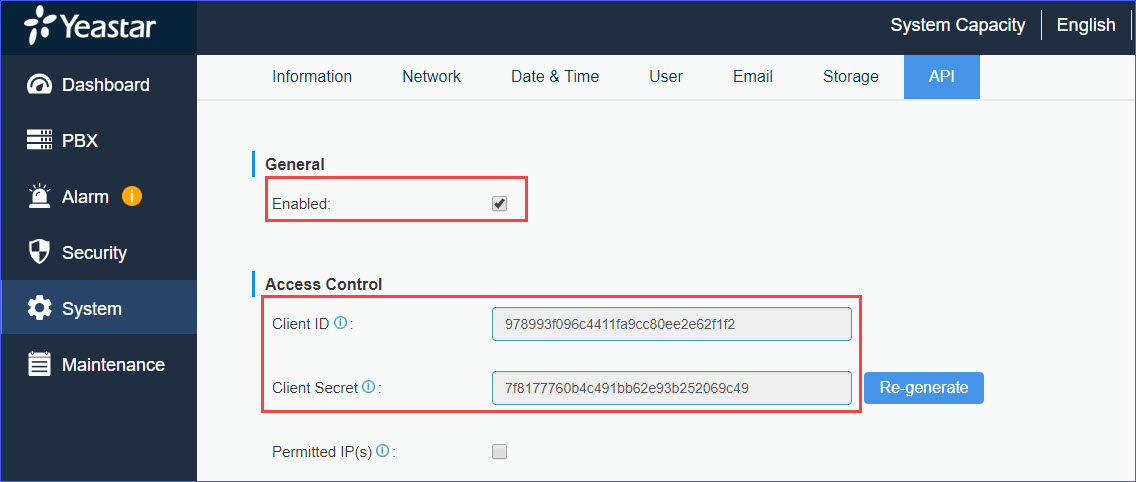
- Enable YMP API and obtain OAuth 2.0 credentials from the YMP web
interface.
Visit your YMP web interface, go to to obtain the Client ID and Client Secret.
HTTP method and endpoint
POST /oauth/token?client_id={client_id}&client_secret={client_secret}&grant_type=client_credentials
Request parameters
| Parameters | Importance | Description |
| client_id | Required | Client ID. Obtain the Client ID from the YMP web interface. |
| client_secret | Required | Client Secret. Obtain the Client Secret from the YMP web interface. |
Response parameters
| Parameter | Importance | Description |
| access_token | Required | A token that can be sent to a YMP API. |
| token_type | Required | Identifies the type of token returned. For YMP API, this
field always has the value Bearer. |
| refresh_token | Required | The refresh token. |
| expires_in | Required | The remaining lifetime of the access token. Time Unit: second. |
| scope | Optional | The scope controls the set of resources and operations that
an access token permits. During the access-token request, your
application sends one or more values in the
scope parameter. |
| login_name | Required | The user name of YMP web login. |
| jti | Required | A JWT(JSON Web Token) that contains identity information of the access token and refresh token. |
Examples
Request Example
POST /oauth/token?client_id=978993f096c4411fa9cc80ee2e62f1f2&client_secret=7f8177760b4c491bb62e93b252069c49&grant_type=client_credentials HTTP/1.1
Host: ympapi.yeastarcloud.com
Cache-Control: no-cache
Response Example
HTTP/1.1 200 OK
{
    "access_token": "eyJhbGciOiJIUzI1NiIsInR5cCI6IkpXVCJ9.eyJsb2dpbl9uYW1lIjoiY2VjaWxpYUB5ZWFzdGFyLmNvbSIsInNjb3BlIjpbInRydXN0Il0sImV4cCI6MTU0NjkxOTE1NiwiYXV0aG9yaXRpZXMiOlsiUk9MRV9hZG1pbiJdLCJqdGkiOiIwODhmNjAxOS0yMWI3LTRjYTEtODQwZi02YWYwOGNjZWEzZDIiLCJjbGllbnRfaWQiOiI5Nzg5OTNmMDk2YzQ0MTFmYTljYzgwZWUyZTYyZjFmMiJ9.maxheg69MJ_Q3PhYP7g0KqJVf4cNoCbFDc9F1s14EVc",
    "token_type": "bearer",
    "refresh_token": "eyJhbGciOiJIUzI1NiIsInR5cCI6IkpXVCJ9.eyJsb2dpbl9uYW1lIjoiY2VjaWxpYUB5ZWFzdGFyLmNvbSIsInNjb3BlIjpbInRydXN0Il0sImF0aSI6IjA4OGY2MDE5LTIxYjctNGNhMS04NDBmLTZhZjA4Y2NlYTNkMiIsImV4cCI6MTU0ODIxMzM1NiwiYXV0aG9yaXRpZXMiOlsiUk9MRV9hZG1pbiJdLCJqdGkiOiI5MTc2ZDY1MC1lNmJiLTQ4NDEtODVhOS05MDZmMWY5MjkxNWIiLCJjbGllbnRfaWQiOiI5Nzg5OTNmMDk2YzQ0MTFmYTljYzgwZWUyZTYyZjFmMiJ9.WOtqgOgPfaZ4PzVxOsNWf2CFPL8KqYVS-i5IwK3ARZA",
    "expires_in": 1799,
    "scope": "trust",
    "login_name": "cecilia@yeastar.com",
    "jti": "088f6019-21b7-4ca1-840f-6af08ccea3d2"
}