Tutorial: Renew Subscription Plan for P-Series Appliance Edition Using API
This tutorial introduces the request parameters and provides a request example to show you how to renew subscription plan for P-Series Appliance Edition using API.
Before you begin: Understand the request parameters
Before renewing subscription plan for P-Series Appliance Edition using API, we recommend that you read the table below to understand the request parameters and collect the corresponding values.
| Item | Parameter | Description |
|---|---|---|
| Operation Type | operationType |
The operation type. In this scenario, the value is fixed at
|
| Product ID | productId |
Specify the product that you want to renew. The Product ID
for P-Series Appliance Edition is
|
| PBX Serial Number (SN) | productNo |
Specify the device for which you want to renew subscription
plan. You will need to query the PBX SN as described in the following steps. |
| Billing Contact ID | billingId |
Specify the contact who can receive the invoice after you
renew subscription plan. You will need to query the Billing Contact ID as described in the following steps. |
| Plan Type | serviceType |
The plan type. In this scenario, the value is fixed at
|
| Plan ID | serviceId |
Specify the specific plan that you want to renew. You will need to query the Plan ID as described in the following steps. |
| Purchase Type | purchaseType |
The purchase type. In this scenario, the value is fixed at
|
| Billing Model | billingModel |
The billing model. In this scenario, the value is fixed at
|
| Billing Cycle | billingCycle |
The billing cycle of P-Series Plan for Appliance
Edition. In this scenario, the value can be
Important: For plan
renewal, you can NOT change the billing cycle.
For
example, if a PBX has been subscribed to plan on a
monthly basis and is to renew the plan, the
value of Billing Cycle can only be
|
| Multi Cycle | multiCycle |
The interval of recurring billing. Whether this parameter is
required depends on the Billing Cycle:
|
Step 1. Get Serial Number (SN) from PBX web portal
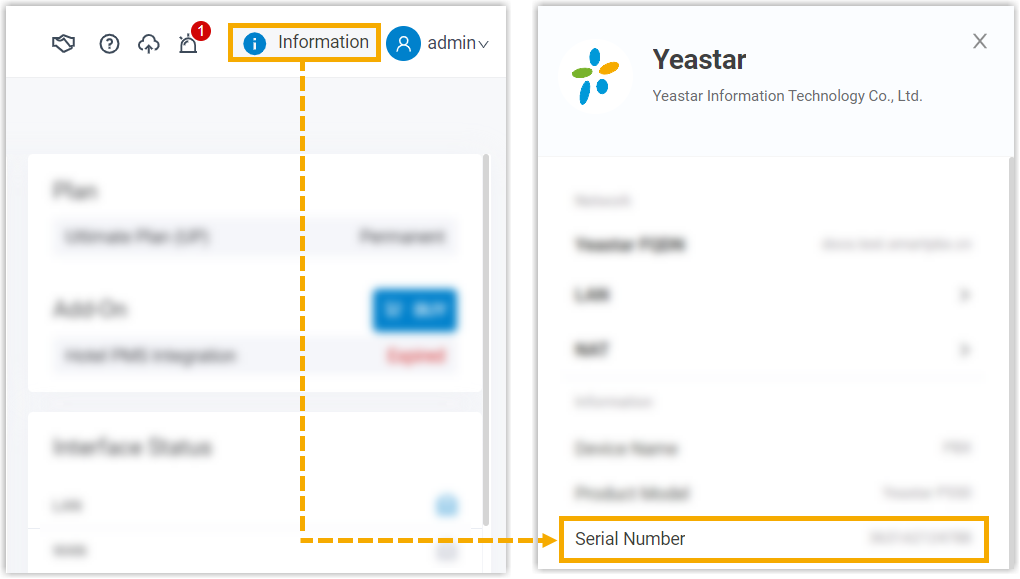
- On PBX web portal, click Information at the top-right corner.
- Scroll down to Information section, then copy the Serial Number.
Step 2. Get plan ID
- Make a request to the Query Available Subscription / Trial Plans and Services for a Product API endpoint with the Product ID
11.GET {base_url}/pricing/openapi/purchase/v1/purchase_product_info?productId=11 - Note down the returned value of
planIdfor the desired plan.
Step 3. Get billing contact ID
- Make a request to the Query Billing Contact List API endpoint.
GET {base_url}/user/openapi/user/v1/client/billing_contact_list - Note down the returned value of
billingContactIdfor the desired billing contact.
Step 4. Renew subscription plan for P-Series Appliance Edition
Make a request to the Create an Order API endpoint with the collected values.
POST {base_url}/order/openapi/order/v1/saveIn this tutorial, the values we collect are shown below:
| Item | Parameter | Value |
|---|---|---|
| Operation Type | operationType |
renew_plan |
| Product ID | productId |
11 |
| PBX Serial Number (SN) | productNo |
3631E0997265 |
| Billing Contact ID | billingId |
3197218168379846218 |
| Plan Type | serviceType |
plan |
| Plan ID | serviceId |
3048560232537899008 (ID for Enterprise Plan) |
| Purchase Type | purchaseType |
renew |
| Billing Model | billingModel |
recurring |
| Billing Cycle | billingCycle |
monthly |
The sample request to renew 1-month Enterprise Plan for P-Series Appliance Edition is shown below:
POST /order/openapi/order/v1/save HTTP/1.1
Host: openapi.partner.yeastar.com
Content-Type: application/json
User-Agent: OpenAPI
Authorization: Bearer eyJhbGciOiJIUzI1NiIsInR5cCI6IkpXVCJ9.eyJhdWQiOlsicmVzMSJdLCJYLU1TLVVTRVIiOiJ7XCJleHByXCI6XCIwXCIsXCJ0eXBlXCI6XCJwYXJ0bmVyXCIsXCJ1Y0lkXCI6XCIzMDc2OTE1NDU0NDY4NzY3NzQ0XCIsXCJ1c2VyQ29kZVwiOlwiUGFydG5lclwiLFwidXNlcklkXCI6XCIzMDc2OTE1NDU0NDg5NzM5MjY0XCIsXCJ1c2VybmFtZVwiOlwicGFydG5lcmV4YW1wbGVAb3V0bG9vay5jb21cIn0iLCJ1c2VyX25hbWUiOiJwYXJ0bmVyZXhhbXBsZUBvdXRsb29rLmNvbSIsInNjb3BlIjpbImFsbCJdLCJleHAiOjE3Mzk3MTc5MjYsInRva2VuX3R5cGUiOiJvcGVuYXBpIiwianRpIjoidmlzMkh0QkxaUStNQmxPbS9UdThWR1pyNFljPSIsImF1dGhvcml0aWVzIjpbIjc5Il0sImNsaWVudF9pZCI6IjE0NDI5NjM2ODBiMjM0YjA0YmRjZDVjMTZmODcyOWQ2In0.RPRoTJRkXCB4krDSwGRpUFyCfUVv2LHjIiBICA1pCiY

{
  "operationType": "renew_plan",
  "productId": 11,
  "productNo": "3631E0997265",
  "billingId": 3197218168379846218,
  "serviceList": [
    {
      "serviceType": "plan",
      "serviceId": 3048560232537899008,
      "purchaseType": "renew",
      "billingModel": "recurring",
      "billingCycle": "monthly"
    }
  ]
}
Result
The sample response is shown below:
{
    "code": "success",
    "detailMessage": "",
    "requestId": "1ac59fb182d39b38411abab17eec0a89",
    "result": {
        "instanceId": "1259567",
        "orderNo": "FZ3206209085273792512",
        "orderStatus": "succeed",
        "productNo": "3631E0997265",
        "transactionNo": "AY3206209086976679937"
    },
    "status": 200
}