Configure Inbound Call Verification Policy
This topic describes how to configure inbound call verification policy on NovoOne platform, including signature valid time, certificate download timeout and rejection criteria.
Prerequisites
- Ensure that you have the permission to view and manage STIR/SHAKEN
feature. Note: If the STIR/SHAKEN entry is not available to you, contact your service provider to grant the permission to your account.
-
Before you begin, ensure you have prepared the following:
-
You have generated an ECDSA key pair using the P-256 curve, and stored the private key securely.
- You have submitted a certificate signing request containing the
public key to the STI-CA (Secure Telephone Identity Certification
Authority), and obtained a valid SHAKEN certificate that meets the
following requirements:
- Signature algorithm:
ECDSA with SHA-256 (ES256) - Format:
.cer,.crt, or.pem
- Signature algorithm:
-
Introduction
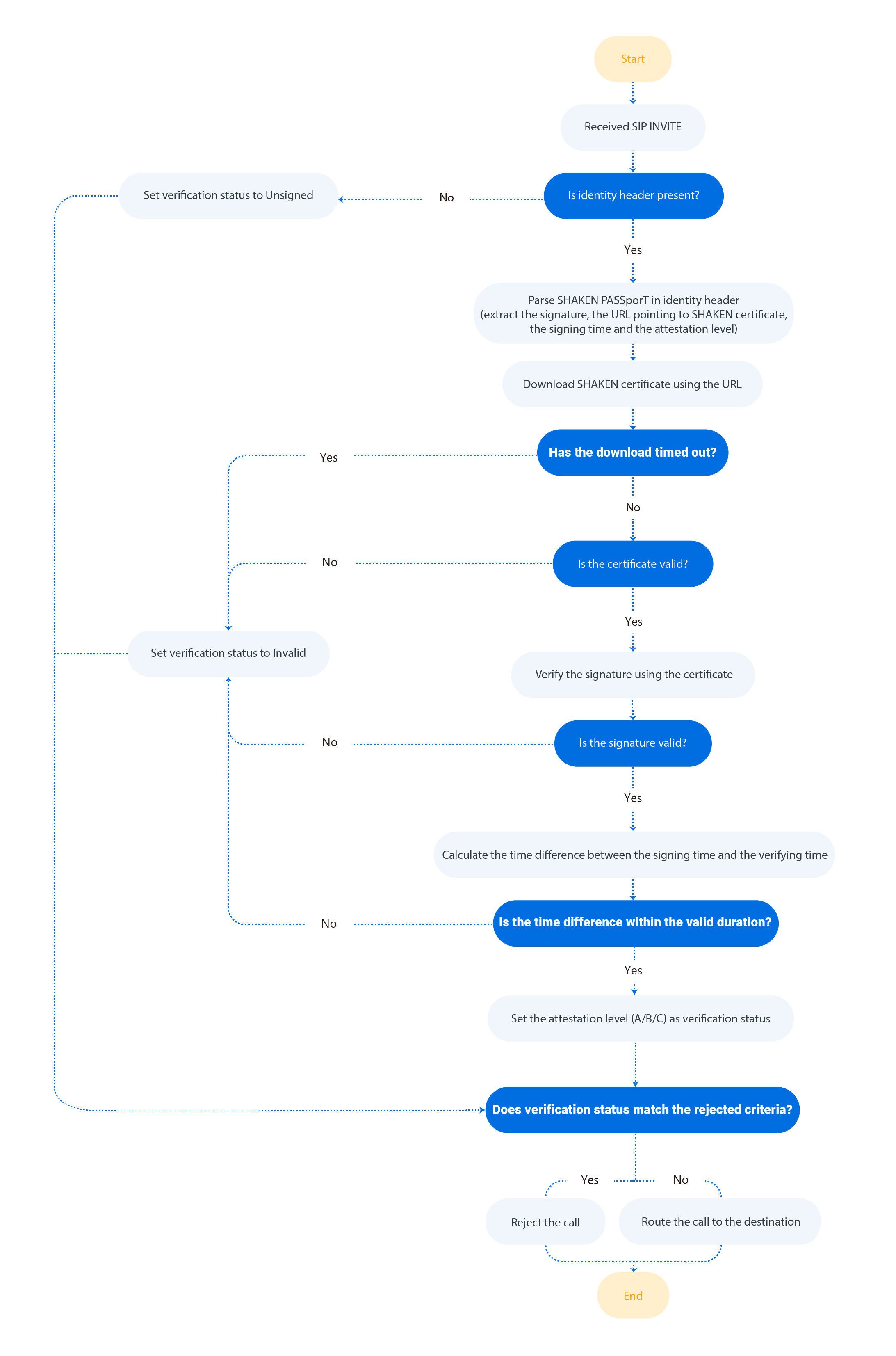
When an inbound call is routed through a trunk with inbound call verification enabled, the system performs direct verification and obtains a verification status. If the status matches the pre-defined rejection criteria in the Inbound Call Verification Policy, the system will reject the call.
The following diagram illustrates the key steps of how inbound calls are verified.
Procedure
- Log in to NovoOne Platform portal, go to .
- In the Verification Settings section, complete the
following settings.

Setting Description Signature Valid Time (s) Set the valid duration (in seconds) for a signature. If the time difference between the signing time and verifying time exceeds this value, the signature is considered invalid.
Note: The supported value is 1 to 300.Certificate Download Timeout (s) Set the maximum wait time (in seconds) for downloading the SHAKEN certificate. If the download exceeds this time limit, the signature verification fails. Note: The supported value is 1 to 30.Drop Calls by Verification Status Select one or more verification statuses that will trigger call rejection. - Unsigned: The SIP
Identityheader is missing. - Invalid: The signature is invalid (e.g., a call with invalid signature or revoked certificate).
- Attestation-C: The call comes from a legitimate gateway, but it cannot be confirmed whether the number belongs to a legitimate user and the number is authentic (e.g., a call routed through legacy PSTN or from international transfer).
- Unsigned: The SIP
- Click Save.
Result
The inbound call verification policy has been saved and is applied to all your trunks in the system.